
A quick and effective Photoshop retouching technique to reduce shadows and increase saturation.
 |
1. Open the image for editing. |
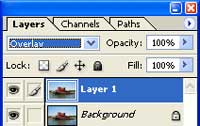 |
2.Duplicate the current layer (Ctrl+J) and change the blending mode to Overlay. |
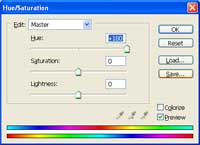 |
3. Use the Hue/Saturation tool (Ctrl+U) to set the Hue to +180. |
 |
4. Invert the current layer (Ctrl+I) and lower the opacity to reduce the effect. Rollover the image on the left of this step to see the original image before this Photoshop technique was applied. |
