


1. Create a new Canvas, 300x300 with a transparent background.
2. Open a picture of your favourite girl and cut and paste into your new document
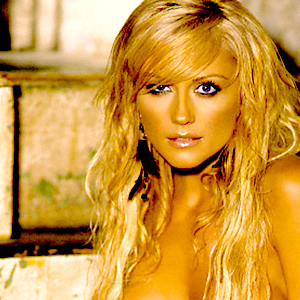
3. Duplicate the layer (layer>duplicate layer) , do a filter>blur>gausian
blur> 1.5 and then set the layer mode to overlay.
4. Duplicate the oringinal layer of your girl, and do a filter>blur>motion
blur > angle=0, and distance=50. Then put the layer mode to soft light.

5. Duplicate the original layer again, and do then do a filter>pixilate>mosaic,
9 pixels.
6. Now do a filter>sharpen>sharpen more, then put the layer mode to soft
light, it should now look like:

7. Now add some text (do this on a layer that is below the layers that had the
blur and soft light), add an outerglow to the text, set the layer mode to multiply
and pick a colour like: #F3D26C. Finally do a edit>transform>rotate 90
degrees
8. Now duplicate this layer and place beside the one you initally created, I
placed it to the left of my girl:

9. Now duplicate one of the text layers, and do a filter>pixelatte>fragment,
and then press ctrl+f to do this filter again, and then duplicate the layer
and press ctrl+e to merge down, now you have another digital binary sort of
layer you can play with, since this is alot softer you can put more of these
on your girl, I played with the opacity, and locations... I also put on over
my inital binary. like so:

10. Now open an render that has a wireframe on it, if you cant find one, here
is the one I used
11. Now set the later mode to screen, and then press ctrl+u to make it greyscale.
12. Place this image, as well as some duplicates of it so that its not exactly
ON the girl, but around, you want to preserve the beauty of this girl, like
I have done here:
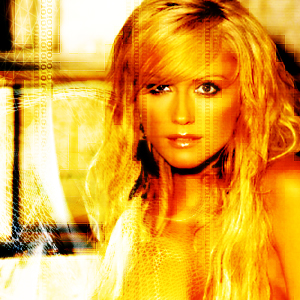
13. Now I have added some text, and I hope that you'll have something like this:

enjoy!
