


Although a basic tool to many users, there is a lot about the text tool that some do not know!
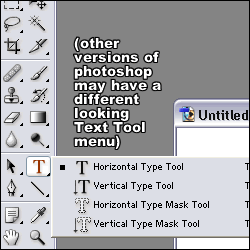
We
want the basic, 'Horizontal Type Tool'. The Mask tools are used for
more advanced text effects, they basically create selections rather
than text itself. I'll get into more on the mask tools on another tut.
How Do You Use It??Well
basically just draw with it (it makes a box as you drag it across your
image) where you want your text to be, and then you can type. If you go
to your character palette, you can choose your font and size and such,
or u can do the same at the top menu thing.
Text General
okay
well there's a few guidelines when it comes to text... don't use any
type of font that's super hard to read opposites look nice :) ex. blue
background, orange text. white text with a black stroke pretty much
looks good on anything :) use fonts according to your image style
(don't use some real crazy font on a sig with two circles on it)
Placement of text
where
you should put your text is kind of hard to explain. it depends on the
image you have made. sometimes typo(typography, aka text. this is what
i will be calling it from now on) looks very nice when you put it
in/near the focal point (area of image which draws most attention).
Other times, it looks good off in no man's land. i recommend trying the
focal point first, but if it doesn't look good there, just fool around
and see where it looks best. on things like signatures, i usually put
my typo in one of the corners.
Other Stuff
Okay
well here's a few things you can do with typo. The first is called
Anti-Aliasing. This is what changes the roughness/smoothness of the
edges of your typo. of course, setting anti-aliasing on none will make
the edges really rough, and putting it on smooth will make them, well,
smooth. As you can see the anti-aliasing options can be accessed in two
different places, on the character palette, and on the top.
Text Effects
Go
to Layer> Layer Style, and u can choose a whole bunch of effects.
stroke is most commonly used, it makes a border around the object (in
our case, our typo). drop shadow makes a shadow underneath it, and well
glow is self-explanatory. Okay! fool around with these :) and you'll be
on your way to cool text.
