Her
Home
Photoshop Tutorials
Web Layout
Stylish Metal Border
Stylish Metal Border
Author: MickM.com
Author's URL:
www.mickm.com
More by this author
Added:
Apr 25, 2005
Rating:
Level:
Beginner
Software: Photoshop
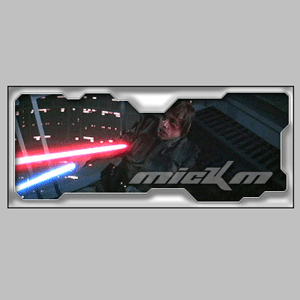
Follow these guidelines to create the signature.
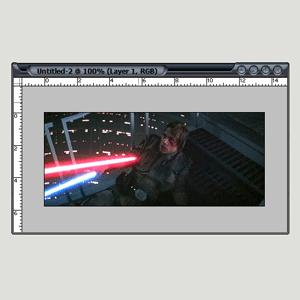
Open a picture you like;
I've chosen for a picture of STARWARS©...
Press: Ctrl+A, Ctrl+C ;
Open a new document (leave the sizes untouched) and press OK;
Press: Ctrl+V;
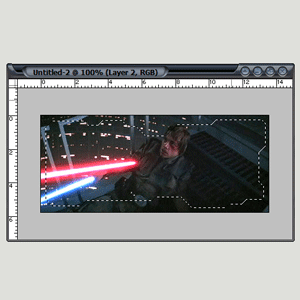
Create a new layer;
Grab the Polygonic Lasso-Tool and make a funny shape that looks like mine;
Press: Ctrl+Shift+I;
Fill the shape with WHITE;
Press Ctrl+D;
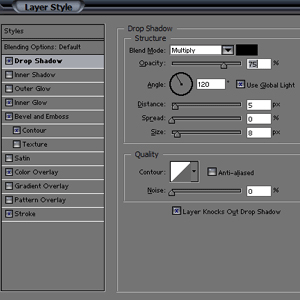
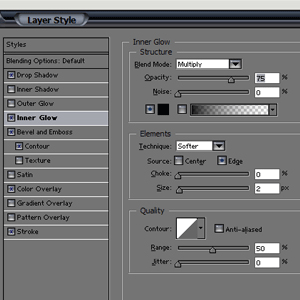
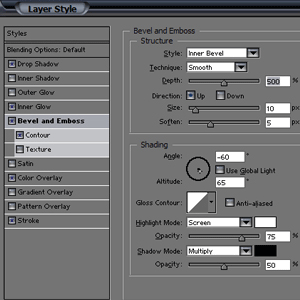
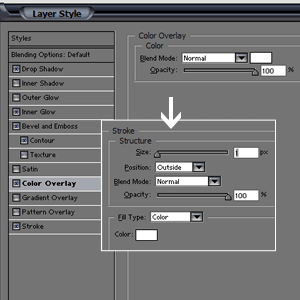
Now add these setting to the layer;
Add some text and you're done.


 Level: Beginner Software:
Photoshop
Level: Beginner Software:
Photoshop 