


1. Begin with a new file, 700x100 with a transparent background. Then press D, now should you have black as your foreground color and white as your background. Now go to Filter>Render>Clouds.

2. Then go to Filter>Pixelate>Mezzotint and choose Long Lines.

3. Now go to Filter>Blur>Motion Blur and set the Angle to 0 and the Distance to 500 pixels.

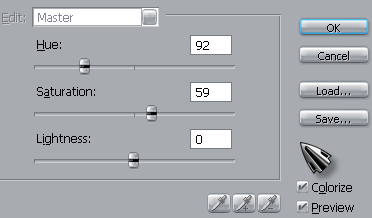
4. Now press Ctrl+U and apply this settings.
Then add some text to your banner and you are done! This is what I came up with.

