
1. Begin with a new file, 700x100, with a transparent background. Now set the foreground color to white, and then take the Paint Bucket Tool and click on your canvas.

2. Now set your foreground color to black and then take the Brush Tool, choose a 17 px round brush and try to do something like image below.

3. Go to Filter>Blur>Motion Blur and set the Angle to 45 and the Distance to 40 pixels.

4. Now repeat step 3 press Ctrl+F 10 times, then press Ctrl+I


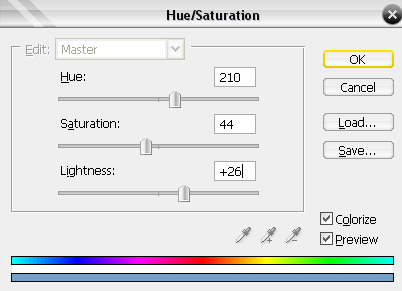
5. Now press Ctrl+U and apply this settings.
And now should it look something like this.

Then add some text, shine to it. This is what I ended up with.

