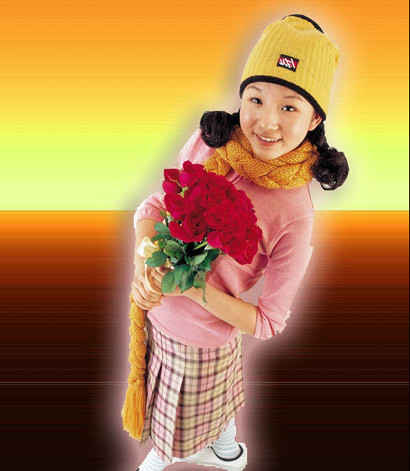
Now that you have the foreground subject on top of the pixel stretch background you can easily spice things up with some layer effects.
To apply a layer effect you can go to the lower left icon on the bottom of the layers palette and choose specifically which effect you want to apply.
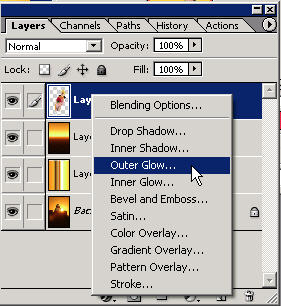
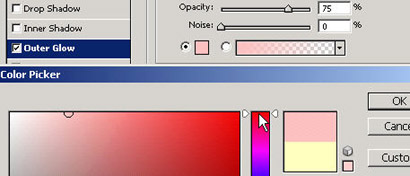
The application will be immediate with the default settings. Here I've chosen outer glow.
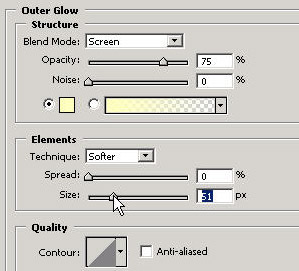
You can make adjustments to any of these layer effects and even
choose a different color as shown (for the effect).
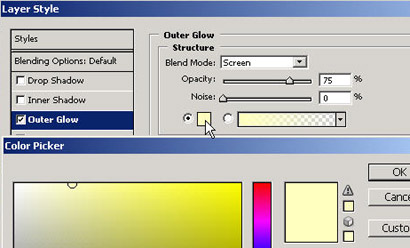
Here I've chosen a pinkish color instead of the default yellow just to show you how easy it is.
You can easily add any other effect to the same layer by clicking
on it with the checkbox. It's important to note that to edit a
field's properties you must highlight the entire namebar itself to
bring up the effect's properties.
Experiment around with each of these and get comfortable in having
an idea of what they can do.
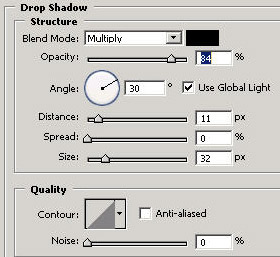
They are powerful tools at your disposable and will often add a
nice finishing touch to your work. (In fact drop shadow on text is
mandatory in most countries and 34 states).
To gain an arsenal of Photoshop knowledge, make sure you get my
Basic Photoshop DVD Training, jam-packed with secrets you've never
before known.