Open a new document. Fill it with #B2B2B2. Pick the text-tool and type a word with #FFD607. Choose a bold font or the tutorial won't work!
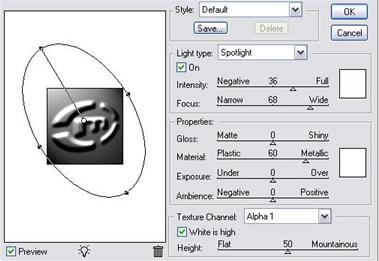
Ctrl + click your text-layer and go to channels-palette. Create a new channel and fill it with #FFFFFF. Go to Filter > Blur > Gaussian Blur and set it to 3 px. Go back to layers-palette and activate the background-layer. Go to Filter > Render > Lightning Effects and use these settings:
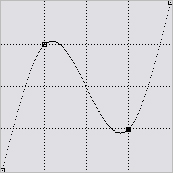
Then Image > Adjustments > Curves (ctrl + m)
Activate the text-layer and set the Layer-Mode to Color.
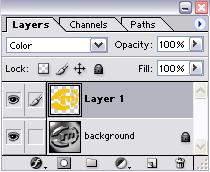
You are finish.