1 | 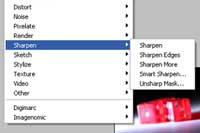 | To apply the Unsharp Mask filter, open the Filter> Sharpen menu and select Unsharp Mask. |
2 | 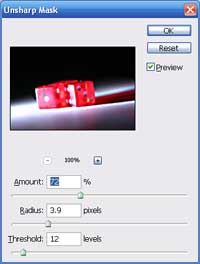 | In
the Unsharp Mask window, choose an Amount for the sharpness. Use a
lower setting for objects with softer edges and use a higher setting
for objects with sharper edges. Adjust the Radius to define the number of pixels around the edges that will be sharpened. To calculate th is, look closely at the objects' edge and estimate the number of pixels the thickness of the edge is. Finally, adjust the Threshold. The Threshold Level will define the amount of area that will be sharpened. A Threshold Level of 0 will sharpen the whole image while a higher Threshold Level will only sharpen higher contrast edges. When sharpening softer objects, use a higher Threshold Level. |
3 |  | Rollover the image to see the image before an Unsharp Mask filter was applied. |
Her
Unsharp Mask Filter
Added:Jul 13, 2005 Rating:

 Level: Beginner Software:
Photoshop
Level: Beginner Software:
Photoshop
Level: Beginner Software:
Photoshop
