Her
Home
Photoshop Tutorials
Web Layout
Navigation Box in a Few Steps
Navigation Box in a Few Steps
Author: MickM.com
Author's URL: www.mickm.com
More by this author
Added:Sep 01, 2005 Rating:
Less than 3 votes yet
Level: Beginner Software:
Photoshop
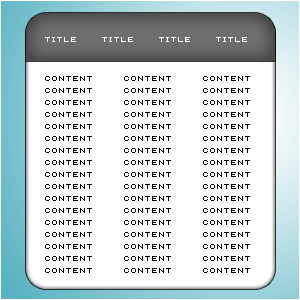
Use the Rounded Retangle Tool to create a box of your liking anywhere;
Also try to use the Radius seen in the toolbar. I always use 20 px, 10 px or 5 px;

Once you've filled it with a random color it's time to get the Retangle-Tool and select a small piece of the top;
Press CTRL+C and CTRL+V to paste it onto a new layer and press CTRL+I;
After that, position it onto the box;

Then Give the box and the header the desired color by pressing CTRL+U;

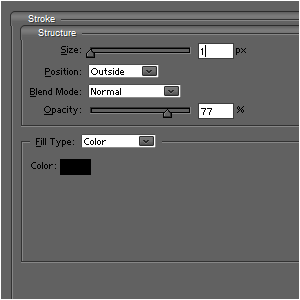
Add these layer-styles to the white area;
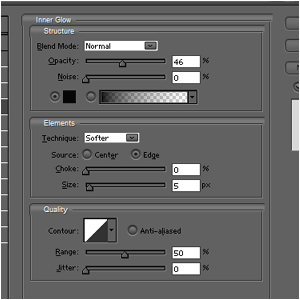
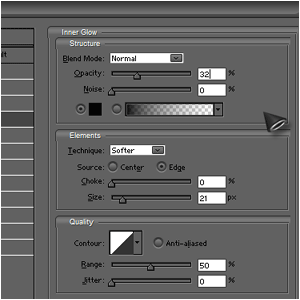
Add these layer-styles to the header;;
And then you're done and you can add some text!