The Image
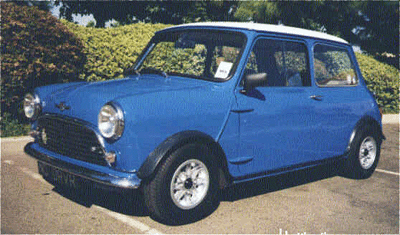
Below is the iamge (the minicar) I will recreate to give it the vector look and feel.
The quality of the image is not so much an issue in this case, as long as, theres enought detail to trace.
The Process
First, right-click and choose either:
A 'Copy', then inside Photoshop go 'Edit/Paste'. (Photoshop will create a document preset size based on the dimensions of the clipboard image). With this method, Photoshop keeps the default locked 'Background' Layer and pastes the image in a new 'Layer 1' directly above the Background Layer. Double click on the word 'Layer 1' to select the text and give the layer a friendly name - in this case 'theimage'.
Or
B 'Save Picture As' to your hard-drive (Desktop is a convient location). Then in Photoshop, choose 'File/Open', and browse to that image location (Desktop, for example) to open it. Notice in the 'Layers Palette', the image thumbnail indicates its an 'Index' image (in this case a quick way to tell that this image is a .gif file.) You'll also, notice, its locked. To correct this, simply go to 'Image/Mode/RGB Color' to revert the locked layer to a 'Background' Layer. Optionally, double click the 'Background' Layer in the Layers Palette to convert it into an edit able layer. (Change the default 'Layer 0' to a friendly name - in my case I called it 'theimage'.)
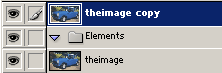
Next, lets duplicate the original 'theimage' layer and if your using Photoshop 7, create a new 'Layer Set' to store all the individual objects(multiple layers). Do so by clicking on the Folder icon at the bottom of the 'Layers Palette', double click on the 'Set 1' default text header and change to what I have (Elements).