Introduction
This tutorial is designed to guide you through the logic and code behind the process of paginating data in PHP. In this tutorial, the data is retrieved from mySQL database. I feel you will be able to grasp this tutorial better if you have a decent knowlege of PHP and mySQL. However, I plan to comment code as much as possible and describe the why we do each part.
What is Pagination?
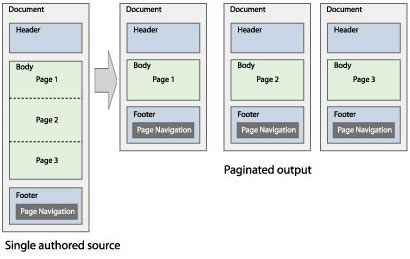
There might be a few of you who are clueless to even what pagination is. For
those with question, pagination is where you have more data that desired appearing
on one page, and breaking up that data so that it is then presented on multiple pages.
It is very likely that you have seen this before. To see a working example, click
this link: Code List
Notice at the very bottom, the page numbers listed and either "Previous" or "Next" to
the left and right. To view more pagination, simply view any tutorial on this site (allsyntax.com)
and navigate to the bottom of each page.
What are the Benifits?
Pagination is excellent in that it is user friendly. Users can navigate through what was normally a large amount of data, and it is now broken into pages which is easy to browse though. Paginating information on your site is also a benifit to you. No longer do you have large amounts of data cluttering up sections of your site. Also, if you were paginating by hand, well- then this method will save you a great amount of time, and you will not know what to do with hands that are not cramped up. This method is customizable in that you can even allow the user to determine the results per page as well.
What do I Need to get Started?
There are a few things you will need before you can get started. The first, being PHP.
Check with your hosting if PHP is a feature. Next, access to mySQL database. The database
part is not necessiarly a requirement, however this is what this tutorial is based around,
and pagination is an accent to your data in the database.
