- Open a black and white picture or make a colored one black and white.
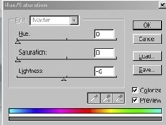
To do so go to Image>Adjust>Hue/Saturation... Or Ctrl+U.
And use these settings:
Hue: 0
Saturation: 0
Lightness: (What you like)
Colorize: Checked.
- Now how do i colorize the image? Well its not very easy and i'm not sure
of an easy and short way to do it. What you do is zoom and select using the
lasso, polygon lasso, and marquee
tool. Ok, here's how it goes: you decide
what part of the image you want to colorize
and you zoom onto the border of that part of the image, if you want to colorize
then you zoom onto where the mouse ends and the hand starts or where the background
starts. When you zoom remember this zoom a lot! The more you zoom the better
the selection will be.

- Once you've zoomed choose the Lasso tool and start making
circles and all kinds of shapes so that you select only what you want. I
suggest doing small parts at a time and adding to the selection with the
shift key (Hold down the shift key and make a selection). You
don't have to use the Lasso tool, you can use any selection
tool including the Magic Wand Just play around with it.
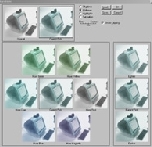
- After you have a selection go to Image>Adjust>Variations and
play with it until you find a color you like. And thats it. Simple but long.

Her
Colorizing Pictures
Added:Sep 26, 2005 Rating:


 Level: Beginner Software:
Photoshop
Level: Beginner Software:
Photoshop
Level: Beginner Software:
Photoshop
