

Like any software CD you'd insert into your CD/DVD ROM, you can make your flash animations, presentations or any project on CD run automatically once the CD inserted.
If you are going to display your flash animation
on a computer that you are not sure has Flash Player installed, publish your
flash project as .exe. This can be remarkably handy especially in schools and
universities where some computers do not have flash player.
An exe file performs the same as your original .swf file, only file size is
greater.
1:
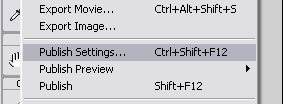
- Once you have saved your flash movie (make sure you dont leave spaces in your filename), go to File>Publish Settings, as shown in fig 1.
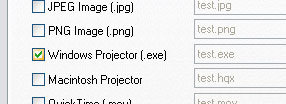
- Place a tick next to the Windows Projector (exe) and untick HTML and Flash.
Click publish. Your flash movie is now published as an .exe file.
- Now that we have our exe file, let's start creating a little file that can trigger the autorun on the CD.
2:
Run Notepad and add the following code:
|
[autorun] open=MyFile.exe |
MyFile.exe is your published project at step1. Remember, no spaces in the filename.
- Now save the Notepad document as autorun.ini
You now have 2 files, MyFile.exe and autorun.ini.
- Burn both files to your CD.
make sure they are placed on the root directory and not in a folder.
