

Step 1:
Open a new document with any size, and fill background layer (Use Paint Bucket Tool  )
with white color: #ffffff.
)
with white color: #ffffff.
Add the nois filter, Filter > Noise > Add Noise, with these parameters: Amount 400%, Distribution Gaussian .
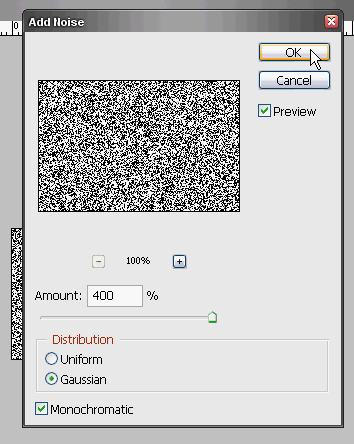
Image 1
Step 2:
Now, go to: Filter > Blur > Motion Blur, Angle: 90°, Distance: 999 Pixels.
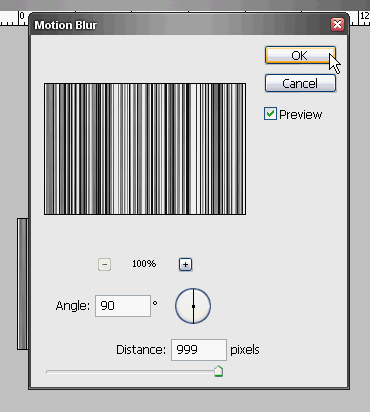
Image 2
Step 3:
Then, go to Image > Adjustments > Brightness/Contrast, put this: +20, +30.
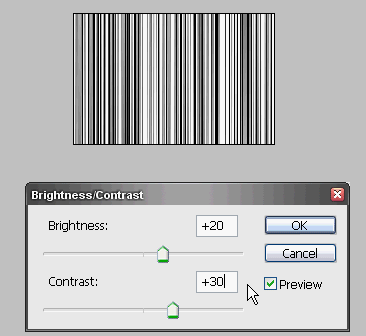
Image 3
Step 4:
Go to Image > Adjustments > Curves, you must regulate the line as in figure, take care, this foot step influences a lot the final result.
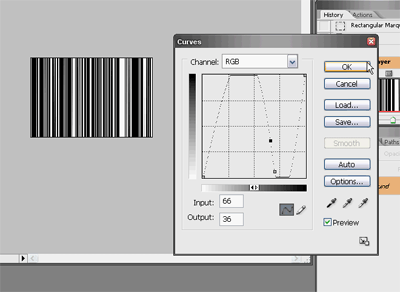
Image 4 (Click to enlarge)
This is my final result, if you apply some modifics you can get a result similar to this:
 Download the Video-Tutorial
Have you some problem to see video tutorial? Download this CODEC: TSCC_codec.rar
Problem with download video tutorial? Right click, Save Target As...
