

This tutorial will teach you how to make professional looking smiles & emoticons like these ones


They look very nice if used in msn messenger
Step: 1
First open a new Photoshop document with white background and size 19*19 and create a new layer
Step: 2
Next make a round selection of 19*19px and fill it with a nice yellow(#fdca00)
Step: 3
Then go to blending options > stroke and give it a blake stroke "inside" at 50%

Step: 4
Now create a new layer under the layer with the yellow and fill it with #ff0000
Step: 5
Next CTRL click the yellow to select it layer and take your gradient tool with a light orange(#ff7200) and use it like this
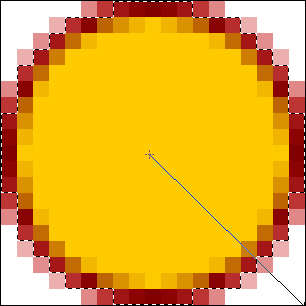
Step: 6
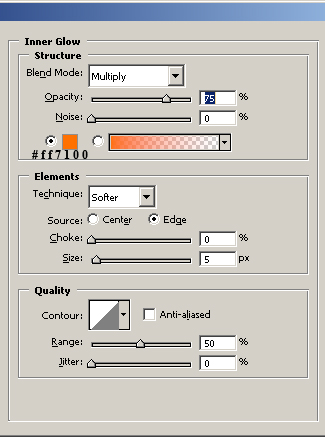
Now once again select the yellow layer and go to Blending Options> Inner Glow, use these options
Step: 7
Now you should have something like this

Step: 8
Next we have to make the eyes and mouth here is how you do it
Step: 9
Create a new layer and add these colors Mouth: #7f0000, Eye Outline #d2b48c, Eye Color #your choice, I like brown

Step: 10
Now again ctrl+click the yellow layer and create a new layer on top of everything and take your gradient tool again use white as foreground color and from the top of the smilie to the mid, you should get something like this

Step: 11
Now here comes the part where you make it nice and flashy
Step: 12
Next create a new layer on top of everything and fill it with any color you like and change the blending mode to color, this is what you get with green


Step: 13
Now if the borders look to dark to you then you can leave away the red layout you made under the yellow one

Step: 14
Finally animating the smilies it is up to you, I'll write a new tutorial on that later
