Here is my Version of the ever popular Segmented Pipes. A staple for interfaces.

1. Create a new layer and make a retangular selection.

2. Select the linear gradient tool and the copper gradient.
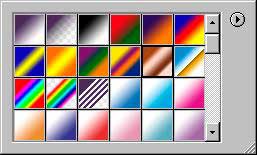
3. Drag from the top to the bottom of the selection, you now have a copper pipe.

4. For this excercise we want a chrome pipe, so suck all the color out by going
Shift+Ctrl/Cmd+U to desaturate the image. Or select desaturate from the menu.

5. Now to make it more shiny chrome, open our famous curves box and use a similar
curve.
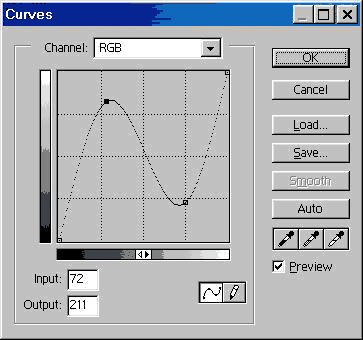
6. And we now have a shiny Chrome pipe..

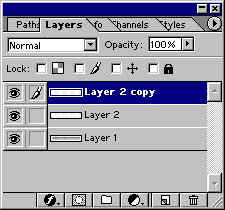
7. To add the segments: Create a new layer and draw a 2 pixel line in black.

8. Duplicate the layer and press Ctrl/Cmd+I to invert the color, press the right
keyboard arrow key 2x to nudge the white line over. Change it to overlay mode
in the layer mode menu.
Link the 2 lines and merge linked.
Alt/Option+Shift and drag the lines to duplicate them along the pipe.
9. Here is a finished one with some color added by using hue/saturation with
the colorize box checked.
About the Author:

Colin Smith is a best-selling author, trainer, and award-winning new-media designer
who has caused a stir in the design community with his stunning
photorealistic illustrations composed entirely in Photoshop. He is
founder of the world's most popular Photoshop resource site, PhotoshopCAFE.com, which boasts more than two million visitors.
With over 10 years of experience in the design industry, Colin was formerly Senior Editor and Art Director for VOICE magazine. He is a regular columnist for Photoshop User magazine, PlanetPhotoshop.com, and the official site of the National Association for Photoshop Professionals. He also contributes to a number of other graphic art publications and Web sites, such as Mac Design magazine, Web Designer magazine and Computer Arts Magazine.
Colin's graphic design work has been recognized with numerous awards,
including the Guru awards at Photoshop World 2001 and 2002, for his
work in both Illustration and Web Design. He's authored or co-authored
more than ten books on Photoshop, including the best-selling How to Do Everything with Photoshop CS (McGraw-Hill/Osborne, 2003) and award-winning Photoshop Most Wanted: Effects and Design Tips (A Press/Friends Of Ed, 2002). Colin is also creator of the Photoshop Secrets Video training series (PhotoshopCD.com).
He is in high demand across the United States as a lecturer, presenting
his Photoshop techniques to Web designers and other graphics
professionals across the nation.


