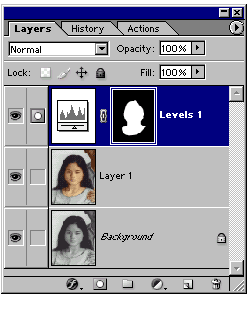
While an adjustment layer is active, by painting, erasing, filling, etc. you edit
the layer mask. By painting with white color you reveal underlying
image to the adjustment effect; by painting with black color, you hide the
underlying image from the adjustment effect.
For more details on masking read Skills.
About the Author:

Since 1999, Andrei has run the digiCollage – an online image editor's shop. Having edited all kinds of customers' images, he has vast Photoshop experience that he willingly shares with you in this course. You are invited to look over an expert's shoulder and see Photoshop in action.


