

IR (stands for ImageReady) has to be installed on your computer during the typical Photoshop
installation. Run it now independently or switch to it from PS (Photoshop) either by clicking
on Jump to ImageReady  button
at the bottom of PS' Toolbox or using [Ctrl+Shift+M] shortcut. Similarly, you can switch
from IR back to PS. The two applications are designed for joint work.
button
at the bottom of PS' Toolbox or using [Ctrl+Shift+M] shortcut. Similarly, you can switch
from IR back to PS. The two applications are designed for joint work.
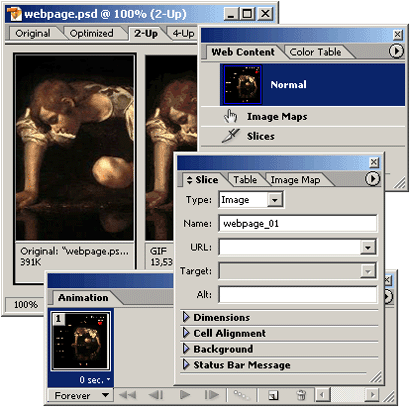
As you can see that the IR interface is very similar to that of PS: the same workarea
with the Toolbox, Options bar and several other palettes. However
you can note a few differences.
1. Image window has 4 tabs allowing us to view the original image and / or previews of Web optimized versions (screenshot).
2. There appear some new palettes.
3. A few different buttons on the Toolbox.
4. One new pull-down menu (Slice).
And lots of minor differences in pull-down and context menus, shortcuts, palettes, etc.
 Since 1999, Andrei has run the digiCollage – an online image editor's shop. Having edited all kinds of customers' images, he has vast Photoshop experience that he willingly shares with you in this course. You are invited to look over an expert's shoulder and see Photoshop in action.
