When you post avatars or banners on websites, there are usually a file size limit (ex. 300 kb).
To make a picture a desired file size, go to File>Save for Web.
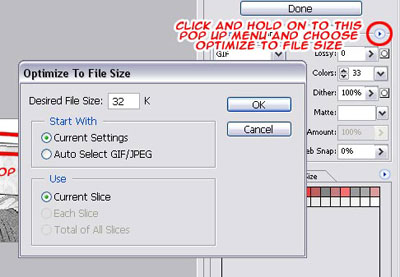
In Safe for Web there is a pop up menu (refer to the picture below).
Click on it and choose Optimize to File Size.
In the dialog box, enter the target file size you need your graphic to be and click OK to have Photoshop optimize the graphic to fit your target file size.
If it doesn't matter to you wheter it's a GIF or JPEG, choose Auto Select GIF/JPEG.