


In this tutorial you will learn how to create your own custom 404 pages, and yes you can make it very cool with all your design abilities, it does not have to look so dull anymore with big 404 error on the page. And don't forget to put a link back to your main page, so that if the user come across your 404 page he/she can click the link and go to your main page. Otherwise you might loose a potential customer or client. Ok let's get started.
1. Open the notepad and type ErrorDocument 404 http://www.yoursite.com/your404page.html Change the site and filename to your own, you can call your 404 page with any name, however it is a good practice to call it 404.html. You can see the notepad screenshot below.
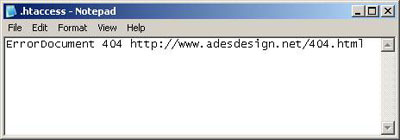
Save this file as .htaccess
2. Now create your 404.html in your favorite HTML Editor, and save it as whatever you called it in the notepad. In my case it is 404.html
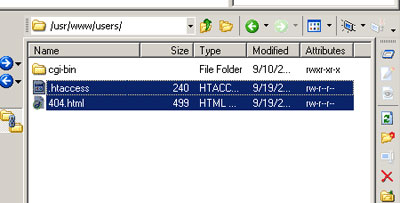
Upload your file to your main folder using FTP client of your choice. Make sure that you upload the files to your main folder. Failing to upload to main folder will make your 404 page to appear in that specific folder only.
3. Go to your website address and type a non-existent page in the browser. And you should be redirected to your 404.page automatically. That's it.
There is other error pages as well, namely:
ErrorDocument 401 -> Bad server request
ErrorDocument 401 -> Authorization required
ErrorDocument 403 -> Forbidden access
ErrorDocument 404 -> Not Found
ErrorDocument 500 -> Internal server error
To make these other error page just add additional lines to your notepad with its corresponding page url. Example:
ErrorDocument 404 http://www.yoursite.com/your404page.html
ErrorDocument 401 http://www.yoursite.com/your401page.html
ErrorDocument 403 http://www.yoursite.com/your403page.html
That's all.
