This tutorial was written for the Flash Designer software, which allows you to create flash animations in a much easier way than by using Macromedia Flash. You may get Flash Designer here.
Download source project t1053.zip (2 kb)
- Launch Flash Designer and set movie dimensions 400 x 300 (or any desired).
- Change frame delay to "Stop".
- Add new frame, change "Frame 1" to "Master Frame (1)"
- Go to "Frame 1", select "Master Frame (1)" as the background:
- Go to "Frame 1"
- Draw ellipse about 16x16 pixels, set line width to none
- Fill it with radial gradient (center color white, outer color "No Color")
- Convert it to sprite ("Edit" > "Convert to Sprite")
- Rename it to "Snowflake" and check "ActionScript Target" under "Item" > "Placement Properties"
- Move the snowflake sprite outside visible area
- Go to "Master Frame (1)"
- Draw a rectangle 400 x 300 and set line width to none
- Fill it with vertical gradient, top color dark blue, bottom color light blue
- Center the rectangle on the master frame
Go to "Frame 1", choose "Frame" > "ActionScript" and paste the code:
|
maxsnowflakes = 100; var snowflakes = new Array(); for(i=0;i<maxsnowflakes;i++) { snowflakes[i] = Snowflake.duplicateMovieClip ("snowflake"+i,100+i); // put it in random place snowflakes[i]._x = Stage.width*Math.random(); snowflakes[i]._y = Stage.height*Math.random(); snowflakes[i]._xscale = 40+Math.random()*60; snowflakes[i]._yscale = snowflakes[i]._xscale; snowflakes[i].yspeed = Math.random()*4+ 1; snowflakes[i].increment = -0.025+Math.random()*0.05; snowflakes[i].onEnterFrame = function() { this.radians = this.increment + this.radians; this._y = this.yspeed + this._y; this._x = Math.sin(this.radians) + this._x; if (this._y>Stage.height) { this._y = 0-10; this._x = 0-10+Math.random()*Stage.width; } } } |
Hit F9 for preview.
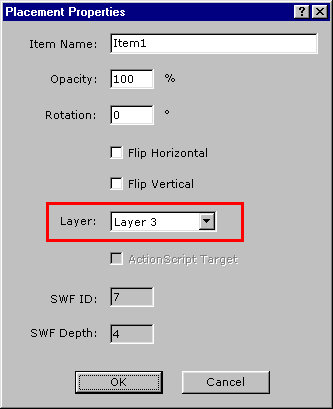
INFO: to place an object in front of snowflakes, select it, choose "Item" > "Placement Properties" and change the layer to higher value, for example "Layer 3":