


This tutorial was written for the Flash Designer software, which allows you to create flash animations in a much easier way than by using Macromedia Flash. You may get Flash Designer here.
Create 2 edit fields for email address and for subject. Name email field "Address" and subject field "Subject". Create "Send" button. Use the following ActionScript code for button's OnUp (or OnClick) event:
|
mailto = "mailto:" + Address + "?subject=" + Subject; getURL(mailto,"_self"); |
1. Launch Flash Designer. Choose "Frame" > "Frame Size" to set movie size (200 x 200).
2. Choose "Edit Field" tool and draw 2 edit fields.
3. Choose "Select" tool. Double click each edit field and change "Variable name" to "Address" and "Subject".
4. Choose "Button" tool and draw a button below edit fields.
5. Choose "Select" tool. Choose "Item" > "Actions" > "OnClick". Select "Action Script" and enter the code. Click OK.
|
mailto = "mailto:" + Address + "?subject=" + Subject; getURL(mailto,"_self"); |
6. Change frame duration to "stop" (choose "Frame" > "Frame Delay" and check "Stop", click OK) 7. Press F9 to preview the animation.
Download SFD file
See also Create,Validate and Email a Form in Flash
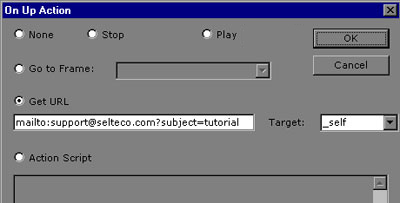
To set fixed email address and subject use Get URL field:
Mailto Syntax
| Address message to multiple recipients | , (comma separating e-mail addresses) |
| Add entry in the "Subject" field | subject=Subject Text |
| Add entry in the "Copy To" or "CC" field | [email protected] |
| Add entry in the "Blind Copy To" or "BCC" field | [email protected] |
| Add entry in the "Body" field | body=Your message here |
Separate parameters with &.
Example
| mailto:[email protected]?subject=tutorial&[email protected] |
Breaking the body into lines
Use %0A as line break, for example:
| mailto:[email protected]?subject=tutorial&body=this body has%0Atwo lines |
Sending email directly from Flash
Flash Player will launch your default mail application to complete and send out the email. To send the email directly you have to execute a web based email script, usually provided by your internet provider. We can't give any exact instructions because the script is provider specific. You have to build a query string and use getURL function to execute the script, for example:
|
body = "This is message body"; email = "[email protected]"; querystring = "http://www.server.com/emailscript.php?" + "body=" + body + "&email=" + email; getURL(querystring,"_self"); |
