

This tutorial was written for the Flash Designer software, which allows you to create flash animations in a much easier way than by using Macromedia Flash. You may get Flash Designer here.
This tutorial demonstrates how to create an edit field and post it to an URL using query string. We will invoke Google search from our Flash document.
Minimum Flash Designer version: 5.0.21.2
Create INPUT field and "Search" button
1. Launch Flash Designer and choose "Blank document" from the startup screen
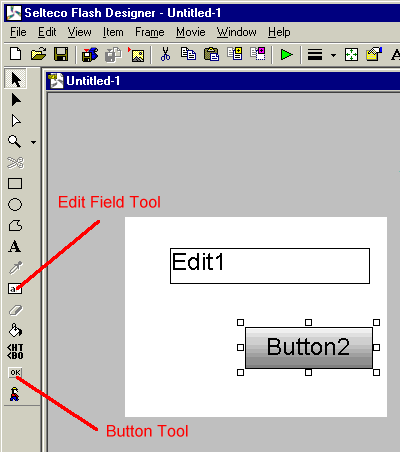
2. Choose "Edit Field" tool. Draw a new edit box. The item will appear as "Edit1".
3. Choose "Button" tool. Draw a new button. The item will appear as "Button2".
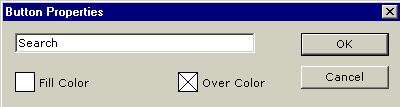
4. While the button is selected choose "Item" > "Edit Properties". Rename the button to Search. Click OK.
Build a "query string" and send it to Google web site
Google search URL is "http://www.google.com/search" and the parameter is "q". For example, if we want to search for "selteco" the full URL would be "http://www.google.com/search?q=selteco".
Use the following ActionScript code:
|
System.Security.allowDomain("www.google.com"); searchURL = "http://www.google.com/search?q=" + Edit1; getURL(searchURL,"_blank"); |
The first line builds search URL and the second line posts the URL to Google web site. If you want to display search results in the same window use "self" instead of "_blank" target.
1. While the button is selected choose "Item" > "Actions" > "OnClick". Select "ActionScript" option and enter above code:
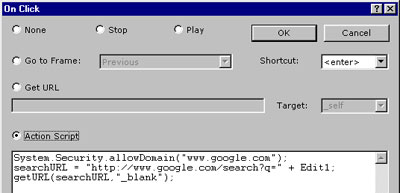
2. Select "enter" as the shortcut key and click OK.
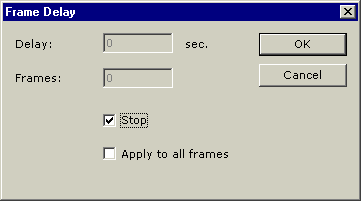
3. To prevent animation looping and clearing the edit field define the frame as static. Choose "Frame" > "Frame Delay" and check "Stop" option.
Finally export the animation.
- Choose "File" > "Export SWF File" command. Name your swf file and click OK.
- Choose "File" > "Export HTML Page". The page should popup in a blank browser window.
Download Flash Designer source project: t1003.zip (300kb)
