

This tutorial was written for the Flash Designer software, which allows you to create flash animations in a much easier way than by using Macromedia Flash. You may get Flash Designer here.
Create text object and link it to some URL.
1. Launch Flash Designer. Choose "Frame" > "Frame Size" to set movie dimensions.
2. Choose "Text" tool and click on the frame. Type the text (for example "selteco.com") and click OK.
3. Choose "Edit" > "Align" > "Center on Page" to center the text on the frame.
4. Choose "Item" > "Actions" > "OnClick"
5. Choose "Get URL" and type the URL (for example "http://www.selteco.com")
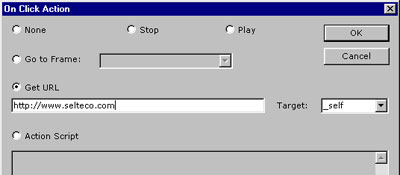
6. Choose "File" > "Export HTML Page". You will have to choose swf file name first. HTML page will popup in a browser window. Click on "selteco.com" to test the link.
To get the URL with ActionScript use getURL function:
| getURL(someurl,targetframe); |
for example:
| getURL("http://www.selteco.com","_self"); |
