


Seen people with reflecting text? "Thought woah cool" Well let me teach.
Step 1 Open the document you want to add the text too.
Step 2 Type the what you want to have on the image, using the text tool.
Example

Step 3 Now duplicate the that text layout and follow these steps, Edit > Transform > Flip Vertical, Make sure there isn't a huge gap between both text layers it should now look something like this.

Step 4 Now create a layer mask, look at the image to see how.
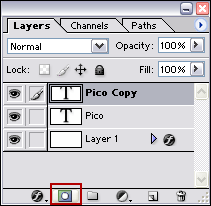
Step 5
Now on your layer mask, Drag with the gradient tool (Use default colors, White and black.)
 from the middle of the text at the top and down past your text which you want to make reflective, and then play around with the opacity to get it looking nice.
Final

That's it, The only thing you got to take note of is that it's not great on all text.
