

This tutorial is gonna show you how to make neon text (Glowing text).
Step 1
Crated a new document with your text, and make the background black, Then set that layer to be invisible (Click the eye just a little left of your layer)

Step 2
Now type your text, Then duplicate it (CTRL+J) and go into blending options and do something along the same lines.
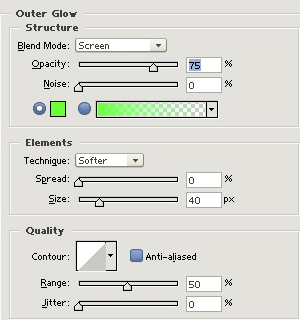
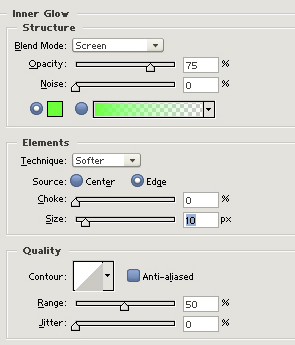
Step 3
Then go to your first text layer, and use the same outer glow settings as we did above.
Step 4
Create a new layer and put it at the top of your layer palette.
Set the blending mode to Color Dodge and then using the filters do Render > Clouds.
Now go to Image > Adjustments > Brightness/Contrast and set the brightness to -55.
Step 5
Now make the black background visible again by clicking the eye.
Final:

Mines maybe a little too bright?
