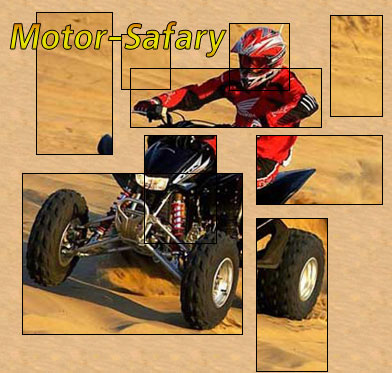
Were you fond of cutting out pictures and making collages when you were a kid? Cutting a picture in geometrically regular shapes and later gluing the squares with some intervals can create a cute effect. Here I'll describe how to achieve the same result in Photoshop. The usages of the effect in the web design domain are versatile, from avatars to website layout.
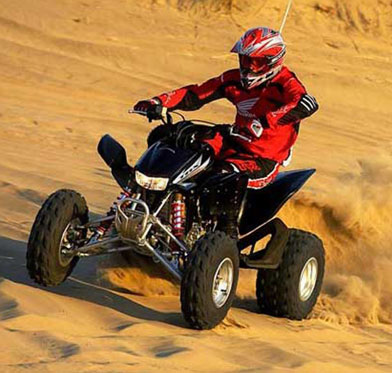
Start form opening an image. One with some human action on the foreground and a sort of background would do best. I chose this one.
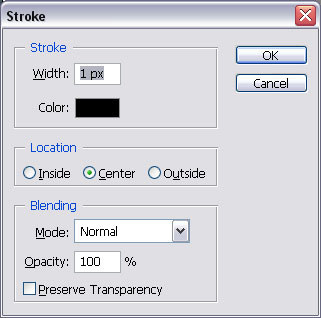
Create a new layer and choose the Marquee tool. Use the tool to select a small area encompassing the biker's helmet. Stroke the selected area with the following settings:
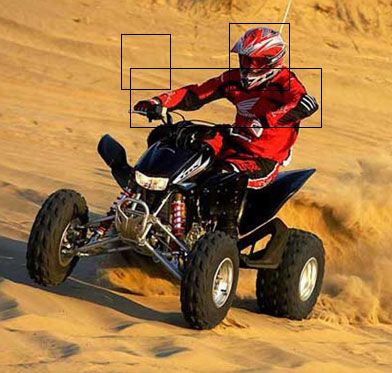
Select one more area, for instance the arms and the torso, and once again apply Stroke with the same settings. Don't worry if the lines cross . Select an area of sand and stroke it again. Here's what I got:
Using the same technique (select, then Stroke), fill up the rest of the image with intersecting and non-intersecting rectangles. Try to select the picture's key elements.
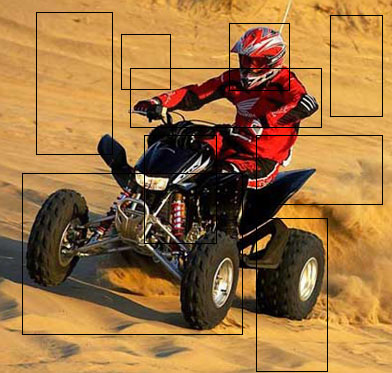
Ctrl+click the thumb of the layer that contains black rectangles. Then choose the Wand tool and holding down Shift, click inside each of the rectangle areas. As a result, you'll have all filled rectangles selected. Create a new layer and fill the selection with any color. Move this layer to the very bottom ((Ctrl+Shift+[).
After that, select the layer containing the biker and Create Clipping Mask.
On the whole, you've done your job.
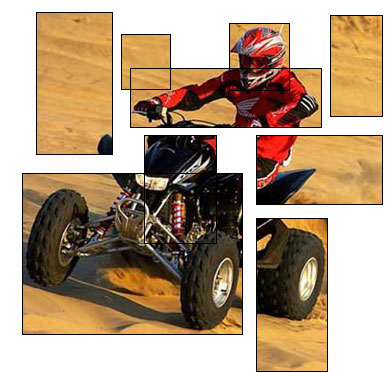
Now you can add background, text or anything else you ever wish. Enjoy experimenting!