Step 1 - Make a sig or any image you want, I'm gonna use a sig i recently made. its 400x85 and you can have it any color u like (*tip gradients work best for this kind of tutorial*)

Step 2 - Go to image<adjustments<color balance and full around with the settles, but on this tutorial I'm gonna show you a good way to get something descent. So put in the following settings.
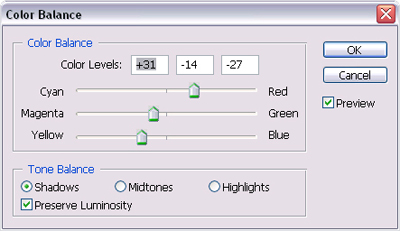
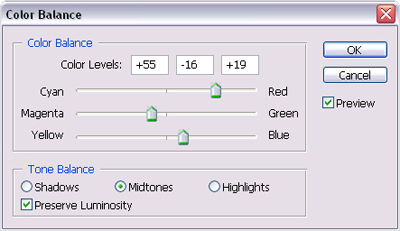
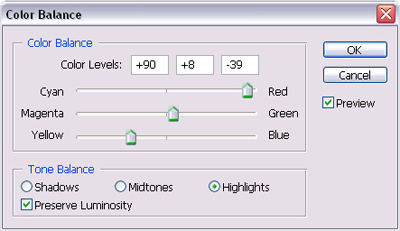

Step 3 - Now to add a bit of brightness and contrast to make it stand out a bit more (this depends on your piece but i used brightness -5, contrast +28)

Step 4 - At this point you could just be done with the colors or go back into color balance and do someone tweaking, now i did a bit more tweaking on mine so its to my liking. So if you feel you need to do the same then go for it. Since I'm finished i did a few more things to my sig so its done, just mostly blurs and a little more colors and this is what i got. Now you can know how to use color balance to make a multi-color graphic.