


Want to start making your own custom materials? This tutorial will help you learn by teaching you how to make your very own glass material! If you enjoy this tutorial, be sure to check out our other great c4d tutorials!
1. Open Cinema 4d, and create a primitive sphere (Objects > Primitives > Sphere). This is going to be our test object to make sure our material looks right:
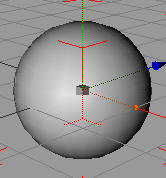
2. Now create a new material. You need to locate the material browser if you have not already. You can find it in the bottom left of Cinema 4d by default. Once you find it, click file > new:
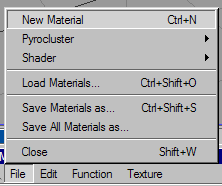
3. Now select your newly created material. You should see a few attributes in your object properties (bottom right).
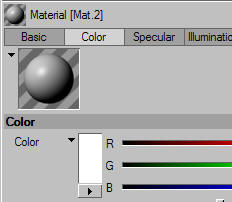
Click the Basic Attributes (Labeled Basic, to the left of color), a new box should come up like this:
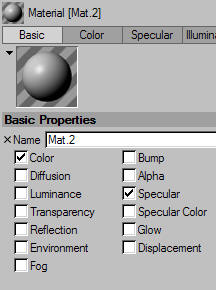
4. Check the boxes as shown below:
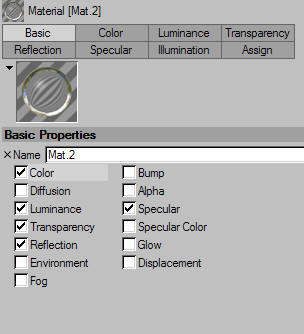
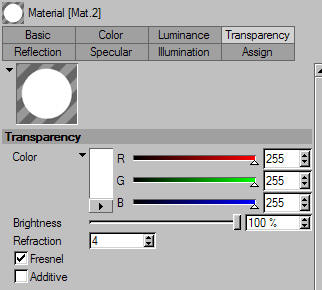
5. The transparency attribute will make your material more or less visible, and give you the options of adding refractions and similar settings to your objects. The reflection attribute will let your material reflect light given off of other objects. Luminance will help give your object light. Go into your transparency attribute, and set it up as follows:
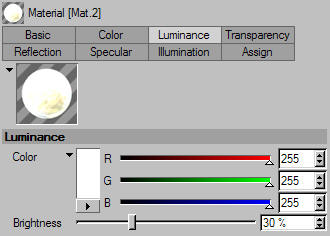
6. Now in the luminance attributes:
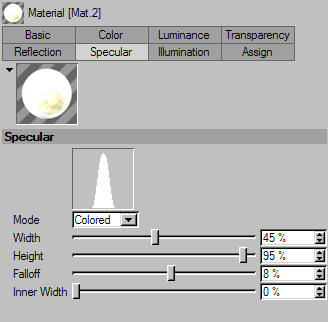
And in specular:
Now in Color:
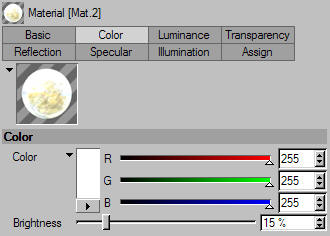
And finally in reflection:
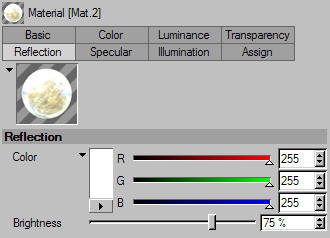
7. Your material is now ready to be put on the object! To place a material on an object, just drag and drop from the material browser to your object!
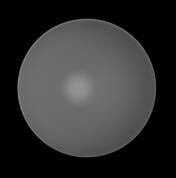
WHAT! It doesn't look much like glass! What's going on??? This may be your first thought, but think it through. Imagine a piece of glass in a room with equal amount of light from every direction. Image this room as blank, with nothing to reflect or refract. What is glass? What do you think of when you think of glass? You most likely picture glass as an object that reflects, refracts, and absorbs light all at once. This is doing all of that, but there is nothing to reflect or refract yet! We need to keep adding on. When you experiment, you can get results like this:

Good Luck!
