


1. The Background
First make a new document (size 400 x 380px) then fill the document with #A4A4A4
Make a new layer and get the Single Row Marquee

And fill the selection with #FCCE41, move the selection down one pixel by pressing the down arrow key then fill with #E69C12

Now set Drop Shadow for this layer:
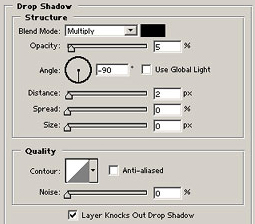
Make a larger selection underneath the orange line and make a new layer, use the gradient tool or the brush tool to make a soft light type effect, lower the opacity and erase if needed.

Again but a bit smaller, use low opacities

Make a 1px line underneath the orange and lower the opacity to about 25%

Another a few more pixels down, and about 20% lighter

Pretty much done for the background

This was more of a walkthrough than a tutorial, don't you think?
Hope you understood this and you could always as on the forum if you need help
Next part will come along one day hopefully
