


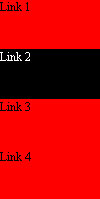
 The way to turn a table cell into a link is to apply a class to a link and to insert the link inside cell, here is the CSS:
|
<style type="text/css"> a.menu:link { text-decoration: none; color: black; display: block; width: 100%; height: 100%; background: red; } a.menu:visited { text-decoration: none; color: red; display: block; width: 100%; height: 100%; background: blue; } a.menu:hover { text-decoration: none; color: white; display: block; width: 100%; height: 100%; background: black; } a.menu:active { text-decoration: none; color: red; display: block; width: 100%; height: 100%; background: white; } </style> |
As you can see I have added a class to a link which is called 'menu' we will add this class to the links that go inside the table cells that we want to make into the rollover links. Now here is the table code that we are going to add the links to:
|
<table width="100" height="200" cellpadding="0" cellspacing="0" border="0"> <tr> <td style="width: 100px; height: 50px;"> <a class="menu" href="http://www.domain.com">Link 1</a></td> </tr> <tr> <td style="width: 100px; height: 50px;"> <a class="menu" href="http://www.domain.com">Link 2</a></td> </tr> <tr> <td style="width: 100px; height: 50px;"> <a class="menu" href="http://www.domain.com">Link 3</a></td> </tr> <tr> <td style="width: 100px; height: 50px;"> <a class="menu" href="http://www.domain.com">Link 4</a></td> </tr> </table> |
This is the table code which you should already know goes in the body of the document as apposed to the CSS which goes inside the head. To see an example of this code click here.
