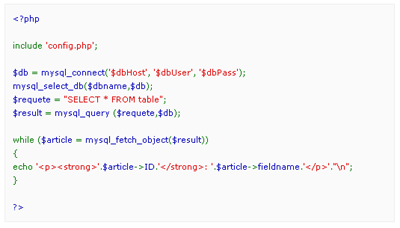
This small guide aims to take the standard output from the PHP function highlight_string() and make it completely valid XHTML 1.0 Strict.
The results of this can be tested via;
- HTML - validator.w3.org
- CSS - jigsaw.w3.org
Firstly, here is an example of what a normal output would be from the highlight_string() function;
Standard Output
| <!DOCTYPE html PUBLIC "-//W3C//DTD XHTML 1.0 Strict//EN" "http://www.w3.org/TR/xhtml1/DTD/xhtml1-strict.dtd">
<html xmlns="http://www.w3.org/1999/xhtml" xml:lang="en" > <head> <meta http-equiv="content-type" content="text/html; charset=iso-8859-1" /> <meta name="author" content="" /> <meta name="Copyright" content="" /> <meta name="keywords" content="" /> <meta name="description" content="" /> <title>Valid XHTML 1.0 Strict Hightlight_String Example</title> <style type="text/css"> #php { width: 500px; margin: 0 auto; border: 1px solid #eee; background: #fafafa; padding: 10px; font: 11px/18px Verdana; color: #000; } </style> </head> <body> <div id="php"> <code><font color="#000000"> <br /><font color="#0000BB"><?php <br /> <br /></font><font color="#007700">include </font><font color="#DD0000">'config.php'</font><font color="#007700">; <br /> <br /></font><font color="#0000BB">$db </font><font color="#007700">= </font><font color="#0000BB">mysql_connect</font><font color="#007700">(</font><font color="#DD0000">'$dbHost'</font><font color="#007700">, </font><font color="#DD0000">'$dbUser'</font><font color="#007700">, </font><font color="#DD0000">'$dbPass'</font><font color="#007700">); <br /></font><font color="#0000BB">mysql_select_db</font><font color="#007700">(</font><font color="#0000BB">$dbname</font><font color="#007700">,</font><font color="#0000BB">$db</font><font color="#007700">); <br /></font><font color="#0000BB">$requete </font><font color="#007700">= </font><font color="#DD0000">"SELECT * FROM table"</font><font color="#007700">; <br /></font><font color="#0000BB">$result </font><font color="#007700">= </font><font color="#0000BB">mysql_query </font><font color="#007700">(</font><font color="#0000BB">$requete</font><font color="#007700">,</font><font color="#0000BB">$db</font><font color="#007700">); <br /> <br />while (</font><font color="#0000BB">$article </font><font color="#007700">= </font><font color="#0000BB">mysql_fetch_object</font><font color="#007700">(</font><font color="#0000BB">$result</font><font color="#007700">)) <br />{ <br />echo </font><font color="#DD0000">'<p><strong>'</font><font color="#007700">.</font><font color="#0000BB">$article</font><font color="#007700">-></font><font color="#0000BB">ID</font><font color="#007700">.</font><font color="#DD0000">'</strong>: '</font><font color="#007700">.</font><font color="#0000BB">$article</font><font color="#007700">-></font><font color="#0000BB">fieldname</font><font color="#007700">.</font><font color="#DD0000">'</p>'</font><font color="#007700">.</font><font color="#DD0000">"n"</font><font color="#007700">; <br />} <br /> <br /></font><font color="#0000BB">?> <br /></font> </font> </code>1 </div> </body> </html> |
And here's the example screenshot;
As you can see, it's not pretty. So now we are going to create a function to neaten it up a bit. This function needs to do a few things;
- Change <font> tags to <span> tags.
- Change color="#" to style="color: #;"
- Remove the <code> tags.
- Get rid of that excess space at the top and bottom.
So, what can we do? Let's create our function to start with;
| <?php
function validxhtml($str) { return highlight_string($str, true); } ?> |
This will do the same job that we are doing at the moment, the difference being we have put the highlight_string function into another function. This is because we can't edit the hightlight_string function itself so we need to create one, put it inside that and then edit that one (it will all become clear).
Next step;
| <?php
function validxhtml($str) { $str = highlight_string($str, true); $str = str_replace(array('<font ', '</font>', '<code>', '</code>'), array('<span ', '</span>', '', ''), $str); $str = preg_replace('#style="color:(.*?)"#', 'style="color: 1"', $str); } ?> |
he code above does 2 things. Firstly we apply the highlight_string function to our code, then after we have added the function we replace certain tags. E.G;
| $str = str_replace(array('<font ', '</font>', '<code>', '</code>'), array('<span ', '</span>', '', ''), $str); |
str_replace will find all occurances of the data stored inside the first array and then replace them with the second lot.
Replacements
| <font <span
</font> </span> <code> </code> |
As you can see, the fonts get exchanged for spans and the code tags get removed completely.
| $str = preg_replace('#style="color:(.*?)"#', 'style="color: 1"', $str); |
The preg_replace function takes the original fonts color="#" and replaces it with style="color: #;".
And now for the last part of the function;
| <?php
function validxhtml($str) { $str = highlight_string($str, true); $str = str_replace(array('<font ', '</font>', '<code>', '</code>'), array('<span ', '</span>', '', ''), $str); $str = preg_replace('#style="color:(.*?)"#', 'style="color: 1"', $str); return substr($str, 37, -9); } ?> |
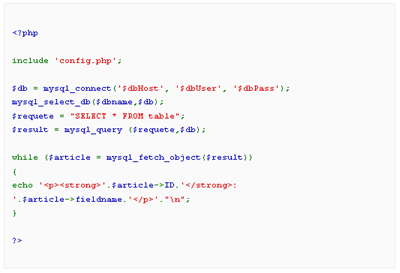
As you can see we now have return substr($str, 37, -9);. The substr function takes our output and takes away 37 characters from the beginning of our data and takes away 9 from the end of our data. Using this gets rid of our horrible gaps that we had in the screenshot.
So what happens when we put this all together?
The source code:
| <!DOCTYPE html PUBLIC "-//W3C//DTD XHTML 1.0 Strict//EN" "http://www.w3.org/TR/xhtml1/DTD/xhtml1-strict.dtd">
<html xmlns="http://www.w3.org/1999/xhtml" xml:lang="en" > <head> <meta http-equiv="content-type" content="text/html; charset=iso-8859-1" /> <meta name="author" content="" /> <meta name="Copyright" content="" /> <meta name="keywords" content="" /> <meta name="description" content="" /> <title>Valid XHTML 1.0 Strict Hightlight_String Example</title> <style type="text/css"> #php { width: 500px; margin: 0 auto; border: 1px solid #eee; background: #fafafa; padding: 10px; font: 11px/18px Verdana; color: #000; } </style> </head> <body> <div id="php"> <?php function validxhtml($str) { $str = highlight_string($str, true); $str = str_replace(array('<font ', '</font>', '<code>', '</code>'), array('<span ', '</span>', '', ''), $str); $str = preg_replace('#style="color:(.*?)"#', 'style="color: 1"', $str); return substr($str, 37, -9); } echo validxhtml(' <?php include 'config.php'; $db = mysql_connect('$dbHost', '$dbUser', '$dbPass'); mysql_select_db($dbname,$db); $requete = "SELECT * FROM table"; $result = mysql_query ($requete,$db); while ($article = mysql_fetch_object($result)) { echo '<p><strong>'.$article->ID.'</strong>: '.$article->fieldname.'</p>'."n"; } ?> '); ?> </div> </body> </html> |
The output;
| <!DOCTYPE html PUBLIC "-//W3C//DTD XHTML 1.0 Strict//EN" "http://www.w3.org/TR/xhtml1/DTD/xhtml1-strict.dtd">
<html xmlns="http://www.w3.org/1999/xhtml" xml:lang="en" > <head> <meta http-equiv="content-type" content="text/html; charset=iso-8859-1" /> <meta name="author" content="" /> <meta name="Copyright" content="" /> <meta name="keywords" content="" /> <meta name="description" content="" /> <title>Valid XHTML 1.0 Strict Hightlight_String Example</title> <style type="text/css"> #php { width: 500px; margin: 0 auto; border: 1px solid #eee; background: #fafafa; padding: 10px; font: 11px/18px Verdana; color: #000; } </style> </head> <body> <div id="php"> <span style="color: #0000BB"><?php <br /> <br /></span><span style="color: #007700">include </span><span style="color: #DD0000">'config.php'</span><span style="color: #007700">; <br /> <br /></span><span style="color: #0000BB">$db </span><span style="color: #007700">= </span><span style="color: #0000BB">mysql_connect</span><span style="color: #007700">(</span><span style="color: #DD0000">'$dbHost'</span><span style="color: #007700">, </span><span style="color: #DD0000">'$dbUser'</span><span style="color: #007700">, </span><span style="color: #DD0000">'$dbPass'</span><span style="color: #007700">); <br /></span><span style="color: #0000BB">mysql_select_db</span><span style="color: #007700">(</span><span style="color: #0000BB">$dbname</span><span style="color: #007700">,</span><span style="color: #0000BB">$db</span><span style="color: #007700">); <br /></span><span style="color: #0000BB">$requete </span><span style="color: #007700">= </span><span style="color: #DD0000">"SELECT * FROM table"</span><span style="color: #007700">; <br /></span><span style="color: #0000BB">$result </span><span style="color: #007700">= </span><span style="color: #0000BB">mysql_query </span><span style="color: #007700">(</span><span style="color: #0000BB">$requete</span><span style="color: #007700">,</span><span style="color: #0000BB">$db</span><span style="color: #007700">); <br /> <br />while (</span><span style="color: #0000BB">$article </span><span style="color: #007700">= </span><span style="color: #0000BB">mysql_fetch_object</span><span style="color: #007700">(</span><span style="color: #0000BB">$result</span><span style="color: #007700">)) <br />{ <br />echo </span><span style="color: #DD0000">'<p><strong>'</span><span style="color: #007700">.</span><span style="color: #0000BB">$article</span><span style="color: #007700">-></span><span style="color: #0000BB">ID</span><span style="color: #007700">.</span><span style="color: #DD0000">'</strong>: '</span><span style="color: #007700">.</span><span style="color: #0000BB">$article</span><span style="color: #007700">-></span><span style="color: #0000BB">fieldname</span><span style="color: #007700">.</span><span style="color: #DD0000">'</p>'</span><span style="color: #007700">.</span><span style="color: #DD0000">"n"</span><span style="color: #007700">; <br />} <br /> <br /></span><span style="color: #0000BB">?> <br /></span> </div> </body> </html> |
And here's screenshot;