1. First you open a new document 300x300 with a white background.Then you go to Layer- New Layer and with your Elliptical Masque Tool you make a shape. Fill it up with (#E6E6E6) .
2. Layer -New Layer and make a new circle inside of the first one. Now go to Layer-Layer Style and pick Drop Shadow
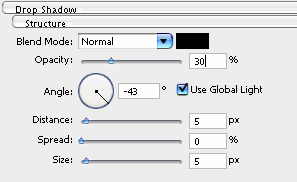
3. Now set the same Layer Style for the first Layer.
4. Now create another Layer and set the opacity to 75% and Soft Light and with the Elliptical Marquee Tool select the upper part of the Shape and fill it with white. This will give us a nice glass effect.
5. The Logo is almost done. Now get another New Layer and this time with the Rectangular Marquee Tool make a Rectangular in the lower part.Be sure one corner of the rectangular is in the shape but not over the white circle and the fill it up with a colour you like.