Step 1
Reset your colors. Create a new document
Width: 300 Pixels
Height: 300 Pixels
Contents: Background Color
Step 2
Choose an orange for the foreground colour and red for the background colour
Step 3
Then create a new layer. Grab your polygonal lasso tool, and make a triangle at the bottom of the screen. Then use the clouds filter.
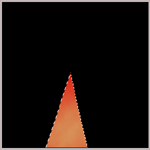
Step 4
Repeat step 3, one or two more times making the triangle different sizes.
Step 5
Now use the Shear filter
Undefined Areas: Repeat Edge Pixels
Move the black line the way you want the flames to curve
Step 6
Repeat step 5 with each layer you created.
Step 7
Select one of the two layers with the flames on them. Then use the Texturize filter
Texture: Burlap
Scaling: 126%
Relief: 2
Light Direction: Bottom
Invert: Unchecked
Step 8
Repeat step 7 with the other layers with the flames(the other layers with the orange/red triangles).
Step 9
Select one of your flame layers. Then open up the blending options. Then set next settings:
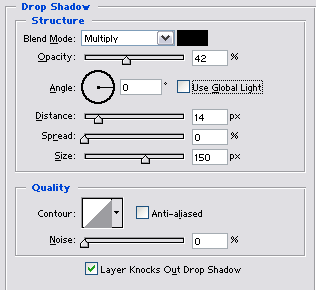
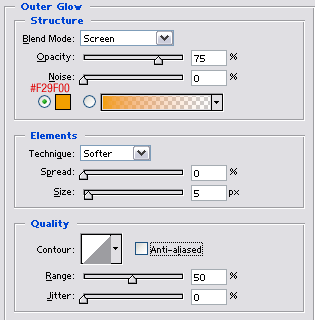
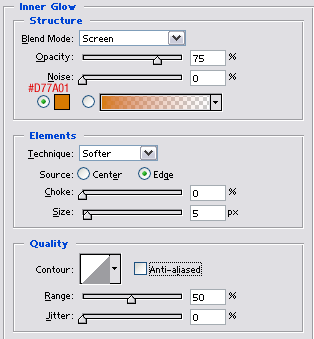
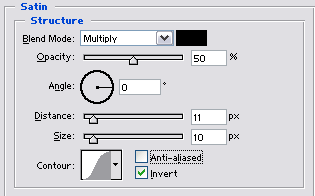
Use the same settings for the other flame layers you have.
Step 10
Now go to the liquify filter and grab the Turbulence tool. Once you've set up the brush size:
Brush Size: 73
Brush Pressure: 100
Turbulent Jitter: 70
The rest of the settings just leave them as they are.
bring the brush to the top portion of your flame, so that the brush covers the top tip of the flame and some of the main flame under it.
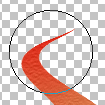
Then click and hold and you will see the tip of your flame slowly transform. Keep holding it until it looks like the tip of a flame. You may have to do this a few times to get the effect you want. If you want to start over just press the "Reconstruct" button.
Step 11
Repeat step 10 with all of your flame layers.
Step 12
Select one of your flames layer then use the Motion Blur filter
Angle: 45°
Distance: 7 Pixels
Step 13
Repeat step 12 with your other flame layers.
Final Product
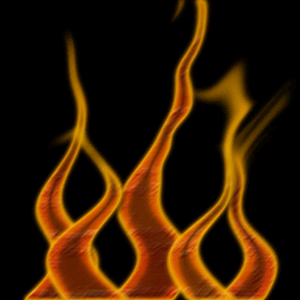
And your done, below is an example of a finished product.