At first make a shape like this with the below color

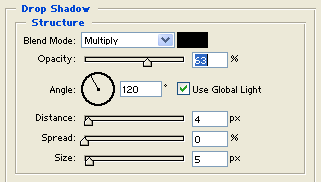
Now give them Drop Shadow in blending options.
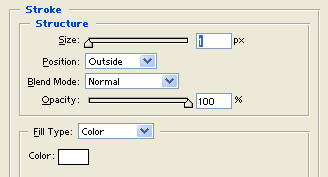
Now give them Stroke in blending options.
Now zoom the button (Ctrl / +) and then click on pencil tools and change the px to 1px and make a arrow like this:

Now small it (Ctrl / -) Then it will be look like this.

Now zoom the button (Ctrl / +) and draw two lines like this:

Now make some start over on the shapes and give them stroke in blending option.