

Result:

Open a new file in Photoshop. My size is 300x100.
Use any font and type any text.
I took techno-style 911 Porscha font.

Duplicate our layer: Layer-Duplicate Layer.
Click on Move tool
 and move our duplicate layer- it'll be our reflection soon:

Let's flip it vertical: Edit-Transform-Flip Vertical.

In the layer window change duplicate layer's opacity to 50%:
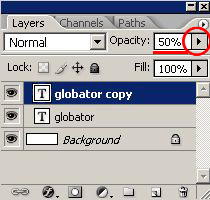
You should get something close to that:

Now we will rasterize our duplicate layer, it'll make it editable with Eraser tool.
Right-click on duplicate layer in the layer's window and choose Rasterize Type
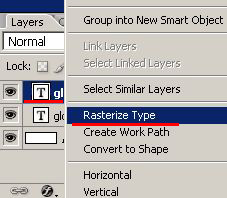
Now choose Eraser
 , set small size and low it's opacity to 10%:

Go ahead and erase lower parts of duplicate layer.
Hold Shift while erasing to get perfect horizontal and vertical lines :0)
Good job!
