Start by applying the default chrome gradient to the background layer.

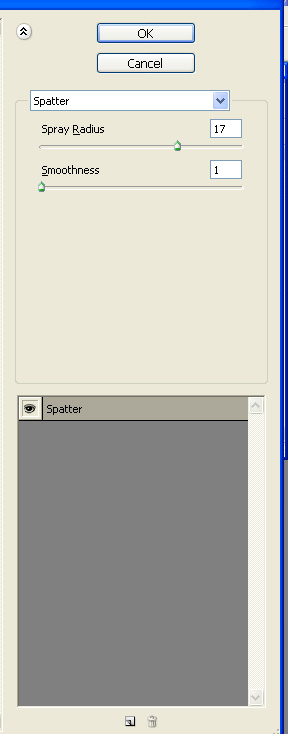
From filter menu apply brush strokes>>spatter.
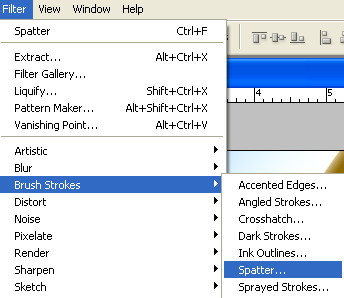
Apply settings as shown.

Duplicate layer. Press Ctrl+T. Right click the layer and select flip horizontal.

Change the layer mode to multiply.

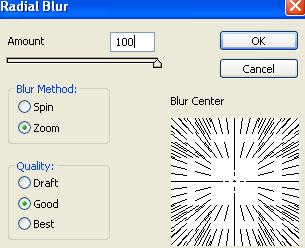
Merge all layers. From filter menu select blur>>radial blur. Apply settings as shown.

Type software name with a bold font.

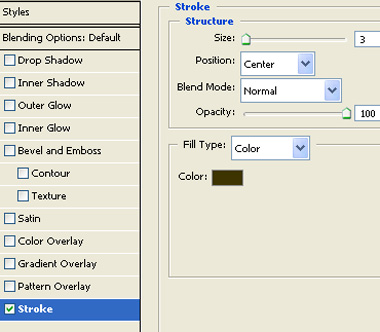
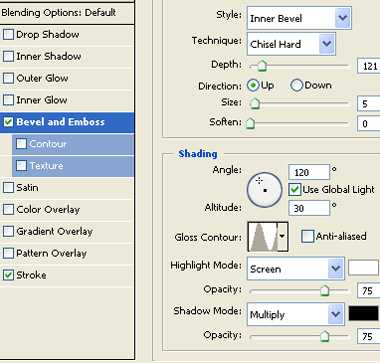
Double click the layer to open layer style window. Apply layer style with the settings shown.
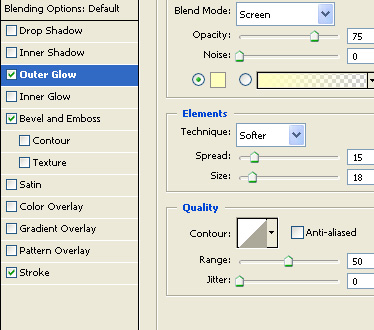

Insert a cutout of a monitor or TV screen and apply some glow

Duplicate the text layer. Press Ctrl+T. Right click the layer and select flip vertical. Reduce the opacity.

Place necessary logos on top right of the splash page.

Type version info on top left of the splash page.

Create a rectangular selection using rectangular marquee tool. Cover almost all the area of the splash page leaving space for a thin border.

Press Ctrl+Shift+I to inverse the selection. Create a new layer on top of all layers. Fill with black color.