Step One
Open a document with any size and type up anything in your mind. In this case, GEL is in my mind. So, I will write that.
Step Two
Go to Layer>Layer Style>Color Overlay and use the color #9BFF26 to fill it.
Step Three
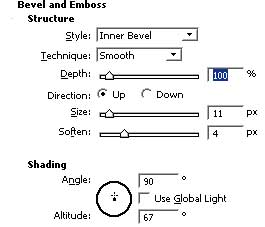
Now navigate your mouse to Bevel and Emboss and use the following settings for it.
Step Four
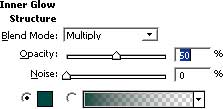
Click Inner Glow and use the below settings using the color #00474.
Now you will see something like below:

Step Five
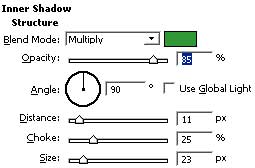
To give it a more "gel" look, click Inner Shadow and use the settings below:
Now you have your gel text effect :)