Step One
I am using Photoshop CS to do this tutorial. Thus, it is great if you are using it, too. It is okay if you are using it. First of all, open an image that you would like to apply Matrix Skin. In this case, I will use a picture of me.

Step Two
To apply the Matrix skin effect, go to Filter>Filter Gallery. If you are not using Photoshop CS, you can skip this step.
Step Three
Click Texture and subsequently click Grain and use the settings below. If you not using Photoshop go to Filter>Texture>Grain.
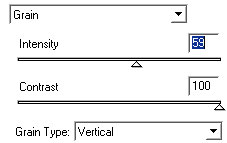
You can play around with the Intensity to come up with something you like. Below is what I came up with.