Step1:
Create a new Image 800 x 600, change the background color to white #FFFFFF.
Step2:
Click on the type tool and type something in your work area. I typed GEL TEXT. Now right click on your gel layer and click on blending options as shown below.
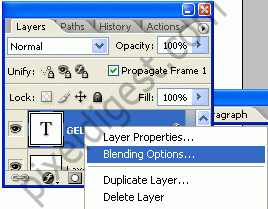
and the Blending Options window will come up. When the window comes up add the setting I have below.
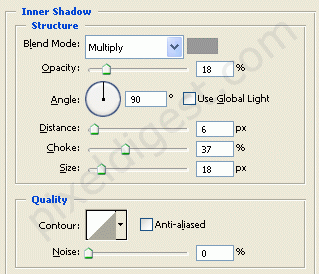
Inner Shadow
Blend Mode Color: #989898
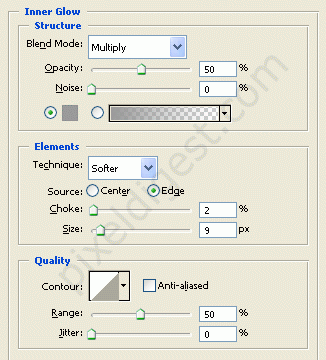
Inner Glow
Blend Mode Color: #989797
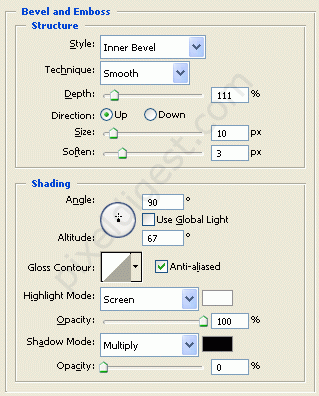
Bevel and Emboss
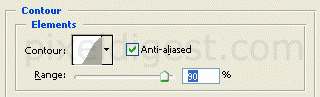
Contour
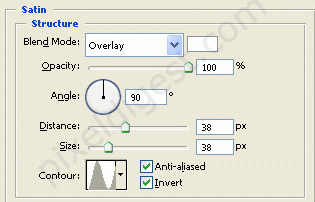
Satin
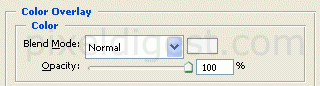
Color Overlay
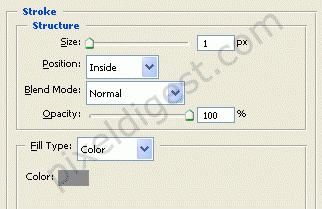
Stroke
Stroke Color: #8b8b8b

