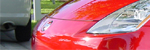
1. First open up a picture you want to apply a color masking to.
2. Now create an adjustement layer by clicking on this icon:
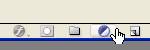
nd then select Hue/Saturation.
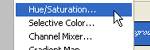
se these following settings:
Hue: 0
Saturation: -100
Lightness: 0
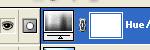
Now you should have a layer like this one:
3. Now select the brush,and set the foreground color to black or any dark color, and then colorize the Hue/Saturation layer you just made.
If you want to earase what you just colorized, change the foreground color to white, and with the brush paint where you want to erase.