Ok, first off make a new document, I'd say 400w and 130h, but it doesn't really matter and it only adds to the effect. Make the background colour transparent.
1. Create a new layer, fill it with the colour #A1A1A1.
2. Apply these settings:
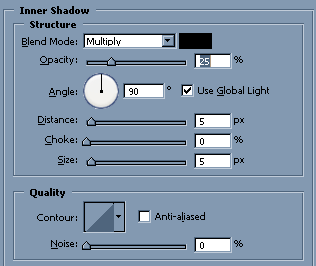
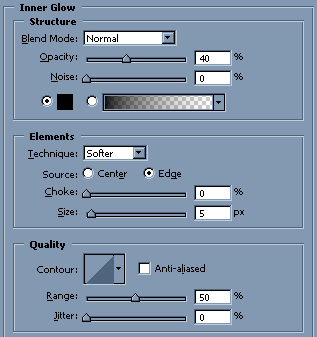
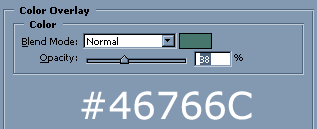
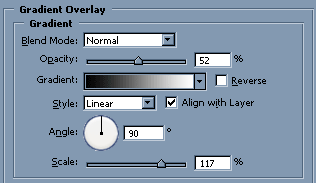
You should now have something looking like this:

3. Now make another layer, fill it with white and place it on top of the gradient green thing you have.
4. Keep on that layer and go to Filter>Add Noise. You can go for something between 10-30%, I went with 15%. Check "Monochromatic" and if it's not already selected, click "Uniform".
5. While you're on the noise layer, press Ctrl+G to create a clipping mask. It should now merge straight onto the greenish layer.
You should now have something looking like this:

6. To finish off the effect, download DS Digital. Install the font into your fonts directory (Windows users, C:WINDOWSFonts)
I went on with the font and created a digital effect by having a layer underneath the text with the figure 8 going under the letters, and then aligning the text layers to give even more of an LCD effect.