

In this tutorial I will show you how to change eye color.
We will get eyes like this:
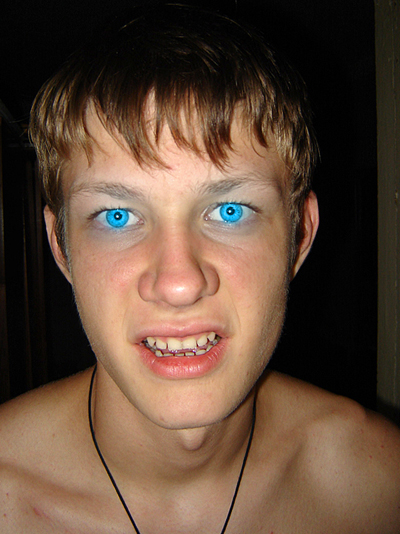
Get a picture, something where the eyes stick out a bit more. I will be using this picture of my brother. It is perfect for this tutorial. Make sure that the picture you are using is a layer, not the background.

We'll take a picture where the eyes are shown very well. It's very important because the more qualitative the picture is, the better effects will be. It's desirable that the eyes should be light-colored. If they are brown then we'll use the instrument Dodge tool and make them lighter.
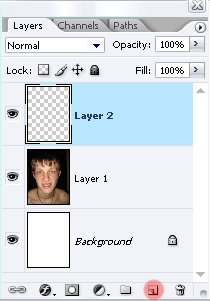
Then we'll create a new background above the picture's one. Here we'll make the lightening of the pupils.
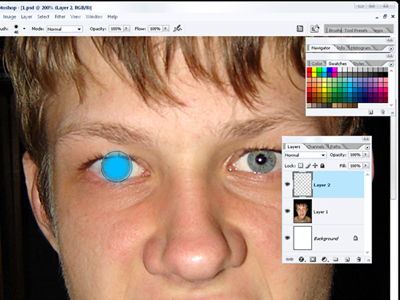
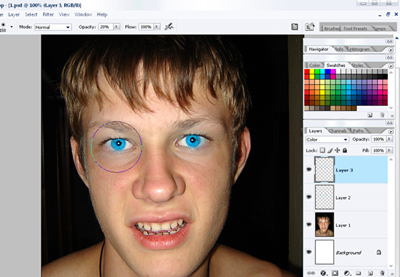
Choose from the instruments panel a brush having approximate dimensions as the eyes (hardness 30%). Choose the color and it's code 00baff. On mouse click and we'll put the circles on the eyes.
Now on the same layer choose the color regime. The eyes become lighter.
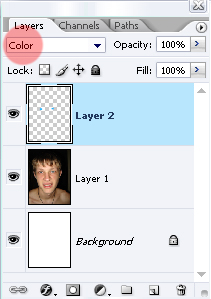
But the color reflection is not enough on the face next to the eyes. We'll create a new background on which we'll make one click on each eye, using the brush like in the picture and an opacity of 20%.As on the previous background, set out the color.
That is what we got as a result of our work. :)
