

Hello people, today we got a very nice Gold Fashion Girl Effect. Its very simple and good looking, enjoy it!

Step 1:
Choose the photo you want to use, size or quality is not a problem here, but a nice photo is always good.

Step 2:
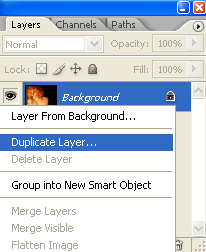
Now, make right click in your background layer (or the layer with the photo), choose duplicate layer.
Step 3:
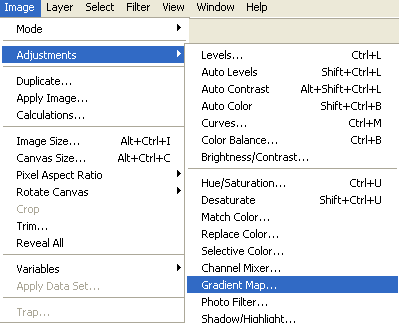
(In your duplicated layer), Go to Image > Adjustments > Gradient Map.
Now you have to make a gradient like this:
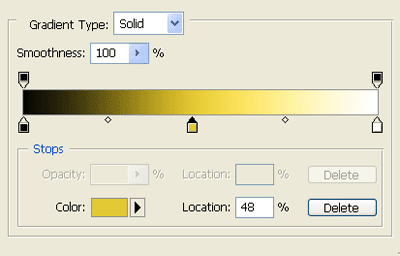
We are using the following colors: Black ( # 000000 ) Yellow ( # e4ce51) White ( # ffffff )
Now you'll have this:

Step 4:
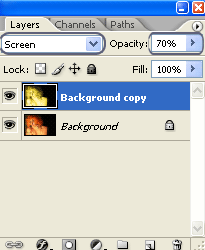
Change your duplicated layer Blending Mode and Opacity, choose Screen and 70%.

Step 5:
Press Shift + Ctrl + E (or go to Layer - Merge Visible)
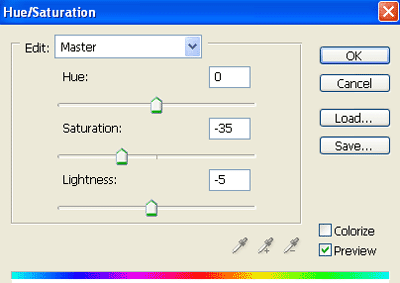
Now go to Image > Adjustments > Hue/Saturation.
Change the values like this:

Step 6:
Go to Image > Levels.
The following settings are just for reference, try to get a similar result.
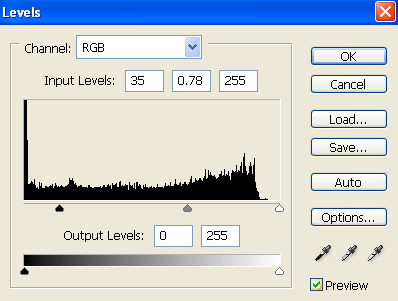
Modify the values until you get something like this:

Step 7:
Now select the Dodge Tool:

Now, you can make some highlights to give the photo the final touch.
I highlight the hair, the earrings, the mouth and the eyes.

And our Gold Fashion Girl Effect its done, hope you like it and see you later for more Photoshop Tutorials.
