

You probably have seen this look many time in magazines and some ads on t.v.,This is a grainy and epic looking style that is easy to achieve with photoshop and a nice Image to work with. Below are 5 pictures from a very talented artist over at www.garylandphotography.com, This look is very impressive and only takes a few steps to complete. While picking a Photo to use remember that you want a bit of texture as well as color.
Here is the original image

...and the Final Result
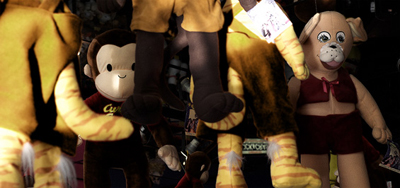
A Closer Look...

Using this technique you will enhance the slightly faded out textures, also it adds a darker contrast to the image and background becomes less distracting as seen in the close up image above...
Let's get Started.
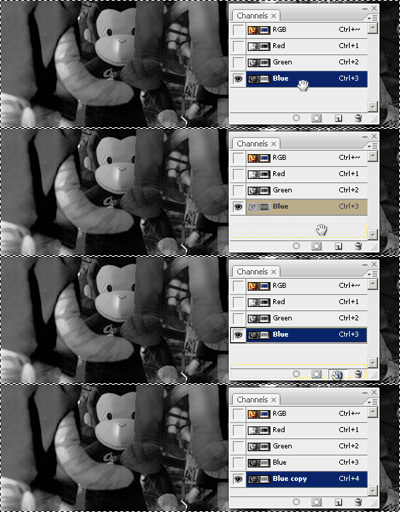
Step 1 : Set up your Document and go to Channels. Then Duplicate the blue channel by dragging it yo the create a new layer button.
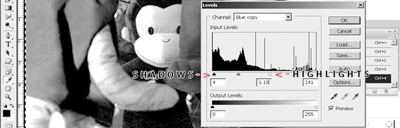
Step 2 : Now with the blue copy selected Go to Image/Adjustments/Levels Slightly Boost the highlights and do the same for the shadows but very lightly.
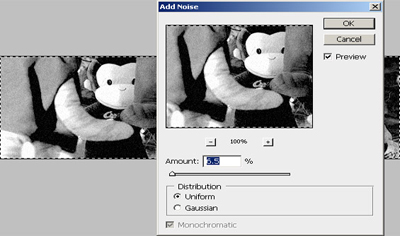
Step 3 : Keep the blue copy layer selected and Go to Filter/Noise/Add Noise add a very small amount of noise just to see a light grain.
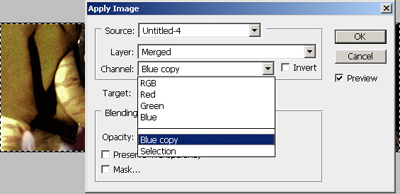
Step 4 : Now Select your original layer in your layers palette and then Go to Image /Apply Image/Channel/Blue Copy
Final Result...
