
Now when information and any type of knowledge is so accessible, making a site is mainly a matter of a wish. Financial costs and time contribution come in second place. You want it - you have it. Any reason of not having a site when you really need it would rather be accepted as a excuse.
You might have already had some experience of creating a site for your High School, some local club or even for your friend's small business. But as you evolve as a specialist you get that burning desire of making indeed something "real". Sure you can become a "Swiss knife" type of a web guy and spend a few years to learn all those skills needed to build OK sites, but if you want to avoid getting in "crappy site of a month" listings start cooperating with other people or just buy results of their work.
You are what you do, so a personal web design portfolio is a great add-on to your words about how great you are. A pre-made template is a good way of not reinventing the wheel. Use experience of other people to your advantage. In most cases it's really cheap and is sure to save your time which is priceless.
So, this tutorial will teach you hot to make a website and perform all necessary customization on the basis of a website template. At the end you will also read our recommendations concerning domain name, hosting provider and your website promotion.
Choosing a template design
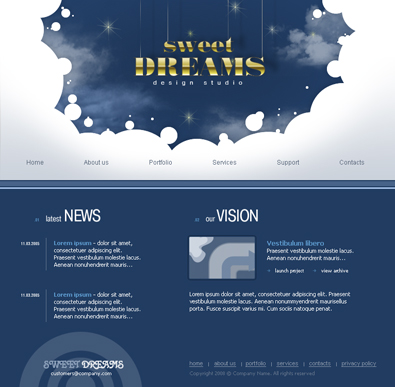
So I found the best variant - to choose a website template and modify it to fit my needs. I recommend you to browse through our website templates. Among all I liked template #22668 so here it is:
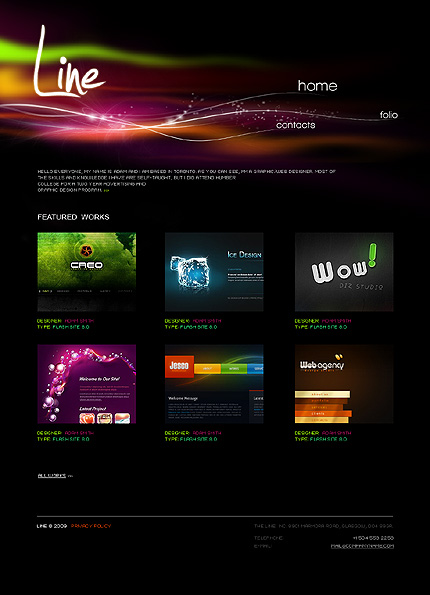
I think this is exactly what we need - let's download it.
In case of a low-budget project, you may take advantage of free web templates that will help you solve both problems: time and money. FreeTemplatesOnline.com offers quality free web page designs that can be easily customized and used as a basis for your website.
Template customization
Now we need to make custom changes with the template to get the best look and feel. Despite the fact that I have a design and the template code for its modification it also requires certain skills, it's not so hard as its creation from the very beginning though.
If you are a web designer and have no knowledge of HTML and don't want to spend time and efforts to learn it - you can easily contact templatetuning.com where you can order the template customization at an affordable price. And along with the rest of the way we will go full customization of your template.
For the full-fledged website we need only design of the home page, we will make other pages on its basis. To get started you will need to install the fonts on your computer (in this tutorial you will find a more detailed description). Then open .psd file in Photoshop and let's make changes in design.
First and foremost we need to change the name of our studio from "Sweet dreams" in something more suitable. In my case, I promptly chose "Templated Business", same as the name of my site. You also can use the possibility to improvise or use the today's fashionable trend for using personal names.
Change the website name on yours in header and footer:
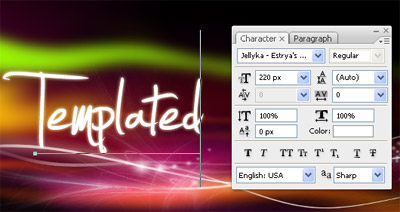
and save it replacing old 'logo.jpg'.
As to menu, we can extract 4 main pages, that can be helpful for you:
- Home
- About
- Portfolio
- Contacts
While we are not such popular yet, lets combine 'about' page and 'contacts'. These are the pages we are going to deal with. Let's start with the menu design. Changes in .psd does not need - all text elements on the page make the text, using HTML code, so you need to change the menu in the HTML page using Dreamweaver. Do not forget to synchronize the changes of the menu in the footer.
Main page is good to show featured projects and to inform your potential and existed clients with the latest works. Just change the content of the page by adding a few images with short description of your recent works. If you're experiencing difficulties with HTML code I recommend you to read a category HTML & CSS Tutorials at Web Design Library.
After these changes your main page should look like this:
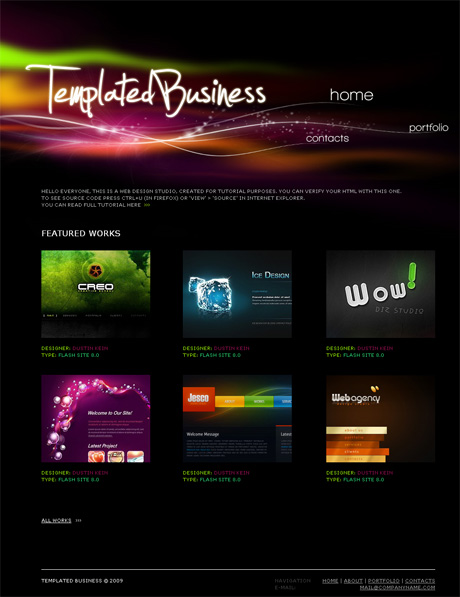
Now you should change the menu links to create the possibility to surf between pages of your website

Note that file names of HTML pages shouldn't contain spaces!
Now you should open each page in your HTML editor and make changes depending on its purpose:
Home - completed already
Portfolio - show us your works! Surprise us and inspire for making order only from you!
About us - tell something about yourself and your studio, your design education, experience and something you want to share with others & Contacts- your contact information, e-mail, messenger, twitter, and any other way to contact you if necessary.
Best practice for this - contact form, but I'll teach you how to do it in some next tutorial.
Choosing a domain name and hosting provider
Well, we have a ready website, so the next thing is a domain name. Your company name (website name) is excellent for this purpose. Check availability at www.checkdomain.com. If the domain is available don't rush to register it, currently most of hosting providers offers free domain name with any hosting package. Just wait a while.
You will need a website hosting for your website placement. Minimum cost hosting package will be enough for your portfolio. So take a look at hosting plans with low disk storage and bandwidth limit. You can get more information about hosting at the pages of Web Design Library.
I recommend you to use hosting services of APlus.net Company. I've got a nice impression about this company due to lots of positive reviews I've heard and additional bonus they offer - a domain name for free. Next you need to setup the DNS server and FTP access for your website. Then using a free FTP client (FileZilla for example), upload all you files together with images folder to the server.
Check everything. Congratulations - your website is ready! You may see how I managed to create my own site here!!!
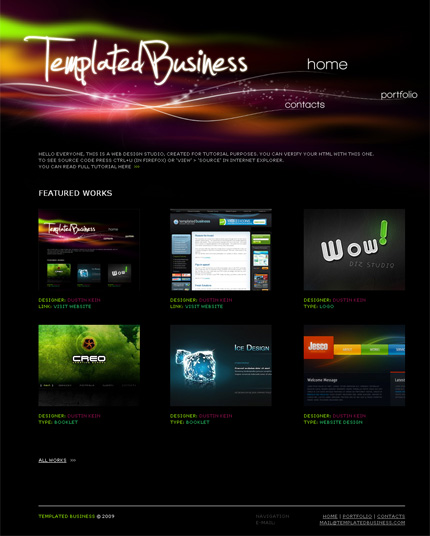
After that you'll need to update website new and portfolio as far as you perform orders.
Website Promotion
You can also try to promote you site in Internet. You will find information you need for the site promotion on Web Design Library. It's pretty easy if you have enough time and patience and also strong willing to learn and, later on, realize your promotion plan.
In case you don't want to perceive all subtleties of SEO and website promotion and do this a bit routine though quite interesting work, you may follow my example and order website promotion services here /website-promotion/website-promotion-standard.php. I made some calculation and concluded that ordering of a Standard Package which costs $235 will be enough for the beginning. It sounds like a pretty expensive service (more over - ii costs double creation of the site), but remember that having bought the template in TemplateMonster, we got a promo code with 50% discount! You just need to pay $115 in addition and promotion of your website will be entrusted to the Web Design Library experts' team. It's relatively low fee for making it easy for you clients to find your site by the keywords you need.
This is almost the end. Quite easy and nice for the first website.
If you want to make it entirely for free - let's go to www.freetemplatesonline.com and look in the category Free Web Design Templates. Among all I liked Template Free Template # 146 so here it is:
I never use free templates for my projects for same reasons I don't have my meals at free food giveaways. $70 bucks is a reasonable price for something that would take me weeks to create. Sites made of the same template can look really different due to smart customization so I've never faced problems of creating a completely unique looking site.
You can visit sample website to see the final result or compare your code.
