

The <TABLE> Tag
The TABLE tag is used to create presentation tables (like spreadsheets), but is more commonly used as a way of controlling the placement of text and images on web pages. All TABLE tags must be closed with a </TABLE>, and contain at least one <TR></TR> and <TD></TD> set, such as:
|
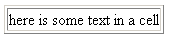 <TABLE>
<TR>
<TD>
here is some text in a cell
</TD>
</TR>
</TABLE>
   <TABLE>
     <TR>
       <TD>
        here is some text in a cell
       </TD>
     </TR>
</TABLE>- BGCOLOR="#FF0000" would set the background color to red.
- ALIGN="CENTER" centers the table. You can also set ALIGN equal to LEFT or RIGHT.
- CELLPADDING=10 places 10 pixels of blank space between the border and the text/images in a cell.
- CELLSPACING=15 places 15 pixels of border between cells.
- BORDER=1 creates a thin border around each cell. 0 means no border.
- WIDTH=550 sets the overall width of the table to 550 pixels. (You can also use percentages such as WIDTH="90%")
- MSIE also supports BORDERCOLOR, BORDERCOLORDARK, and BORDERCOLORLIGHT.
The <TR> Tag
The TR tag is used to create the rows within TABLES that will contain cells. All TR tags must be closed with a </TR>, and be used within a table structure such as:
   <TABLE>
     <TR>
       <TD>
        here is some text in a cell
       </TD>
     </TR>
</TABLE> |
The <TD> Tag
The TD tag is used to create cells within TABLES. All TD tags must be closed with a </TD>, and be used within a table structure such as:
   <TABLE>
     <TR>
       <TD>
        here is some text in a cell
       </TD>
     </TR>
</TABLE> |
- BGCOLOR="#FF0000" would set the background color to red.
- ALIGN="CENTER" centers the contents of the cell. You can also set ALIGN equal to LEFT or RIGHT.
- VALIGN=TOP pushes the content of the cell to the top of the cell. You can also specify VALIGN=BOTTOM or VALIGN=MIDDLE.
- COLSPAN=2 indicates that this cell spans two columns of the table.
- ROWSPAN=3 causes the cell to span three rows of the table.
- WIDTH=250 sets the width of the cell to 250 pixels. (you can also use percentages such as WIDTH="25%" to set the WIDTH)
- MSIE also supports BORDERCOLOR, BORDERCOLORDARK, and BORDERCOLORLIGHT.
