

1. You need to add shape hints to the shape for this tutorial.
2. Create a new file.
View > Rulers
View > Grid > Show Grid
View > Grid > Edit Grid (10 X 10 px)
3. Drag the horizontal & vertical guide lines to get the center.
View > Guides > Lock Guides
4. Type 'I' with proper size and font. Select the text.
Modify > Break Apart
Cut and paste the text to place it at the center.
5. Rightclick on the 15 th frame. Select insert Blank keyframe. Type 'C' with same size and font. Select the text.
Modify > Break Apart
Cut and paste the text to place it at the center.
6. Click anywhere between 1 to 15
Modify > frame
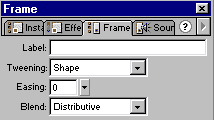
Select 'Shape' in the Tweening drop down menu.
7. You will get the following output.
Now we will add the shape hints to control the shape change.
8. Select first frame.
Modify > Transform > Add Shape Hint
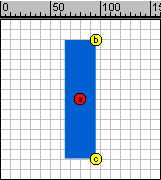
You will get shape hint icon with red color and letter 'a'
Again repeat the procedure twice to get two more shape hints with 'b' & 'c' inside.
Drag them at the position shown below.
9. Select 15 th frame.
Repeat the 8 th step for letter 'C' also.
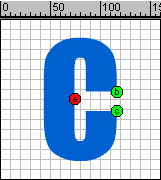
10. You will get the following output.
11. Create a proper smooth animation using following timeline.
Keep the same shape for 15 to 20.
Tween the shape 'c' to 'I' from 20 to 35 using shape hints.

12. Save the file.
