

This little will show you how to easily create a little Diamond that can be placed anywhere
1. Firstly, start with a dark background on a canvas about 400px x 400px

2. With your polygonal lasso tool, make a selection similar to the one on the picture. This will be the diamond shape - You will need to fill it white then deselect.

3. Once you have clicked Layer > Layer style > Blending options, you will need to lower the 'fill opacity' down to 13
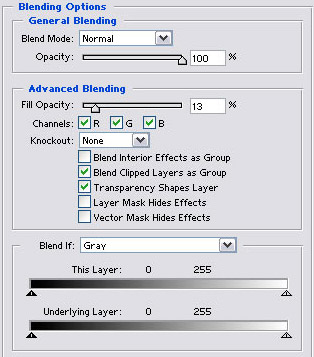
Click to enlarge
|
4. Outer Glow should have the following settings:
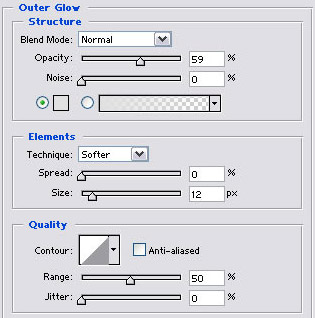
Click to enlarge
|
5. Inner glow should have the following settings:
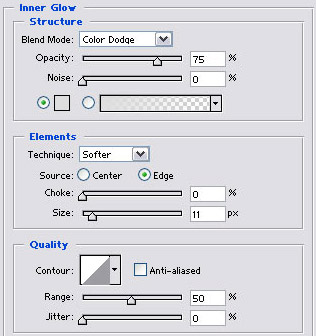
Click to enlarge
|
6. Bevel and Emboss should have the following settings:
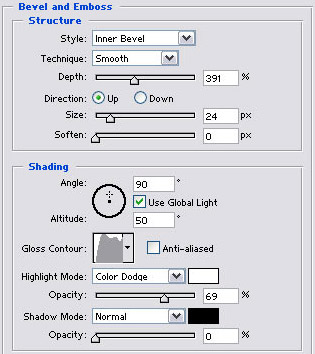
Click to enlarge
|
7. Contour should have the following settings:
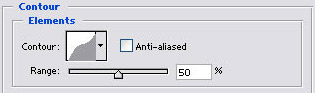
Click to enlarge
|
8. Satin should have the following settings:
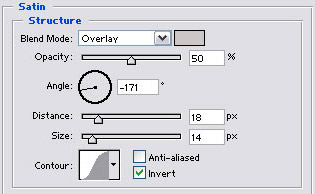
Click to enlarge
|
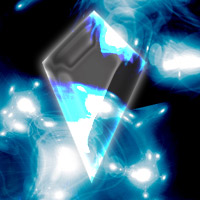
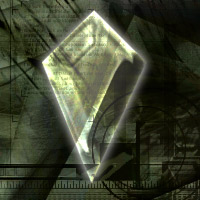
9. This will defiantly look good on all kinds of backgrounds, that's it really. you've done! Click here to download the PSD.
 |
 |
 |
 |
Final result | |
